Choosing the right hub can make home automation simpler, faster, and far more reliable. The best options bring your devices together, reduce app overload, and help routines run smoothly.
This roundup of smart home hubs for home automation focuses on compatibility, control style, and value so you can pick a platform that fits your devices and your daily habits.
Best 10 Smart Home Hubs for Home Automation Picks for 2026
Easy Start Pick

- Preinstalled Home Assistant for quick setup
- Official Nabu Casa hardware with local data control
- USB expandability for Z-Wave, Zigbee, and Thread
Best For: First-time Home Assistant users who want a simple local hub
Wall Control Pick

- 8-inch dashboard for devices, cameras, and routines
- Built-in hub supports Zigbee, Matter, Thread, and more
- Wall-mountable smart home control panel
Best For: Alexa users who want a dedicated home automation display
Long-Range Sensor Pick

- LoRa-enabled hub with very long range
- Central controller for YoLink devices
- Good fit for security monitoring and sensors
Best For: YoLink users who need long-range coverage for sensors
Advanced Local Pick

- Runs core automations locally on the hub
- Supports Z-Wave, Zigbee, Matter, and Bluetooth
- Advanced rules without a mandatory subscription
Best For: Power users who want local control and complex automations
Top Pick
Lutron hub for Caseta lighting and major ecosystems

- Works with Alexa, HomeKit, Google Assistant, Ring, Serena shades, and Sonos
- Clear Connect Technology is designed not to interfere with Wi-Fi devices
- Easy plug-in setup and support for up to 75 Caseta devices
Best For: Users building a Lutron Caseta-based home automation setup with wide ecosystem support
Best for Matter Flexibility
Aqara Matter hub with local automation and Thread

- Matter Bridge for Aqara Zigbee products and Thread device support
- Works with Apple Home, Alexa, and Home Assistant
- Local automation helps keep routines responsive without cloud access
Best For: Buyers who want a compact Matter-capable hub for Aqara devices and local automation
Budget Gateway
Tuya Zigbee and Bluetooth Mesh gateway

- Combines Zigbee, Bluetooth Mesh, and Wi-Fi control in one gateway
- Works with Smart Life/Tuya Smart apps plus Alexa and Google Assistant
- Easy setup with no network cable required
Best For: Tuya users who want an affordable gateway for Zigbee and Bluetooth Mesh devices
Local-First Automation

- Supports Zigbee, Matter, Thread, and Ethernet
- Works with 1000+ brands and major voice assistants
- Local processing and no subscription required
Best For: Homes that want broad compatibility and local control without monthly fees
SmartThings Expansion Hub

- Works with thousands of compatible devices
- Supports Matter, Zigbee, and Z-Wave Plus on V3
- Local automations and app-based setup
Best For: SmartThings users who want broad compatibility and easy setup
Offline Matter Bridge
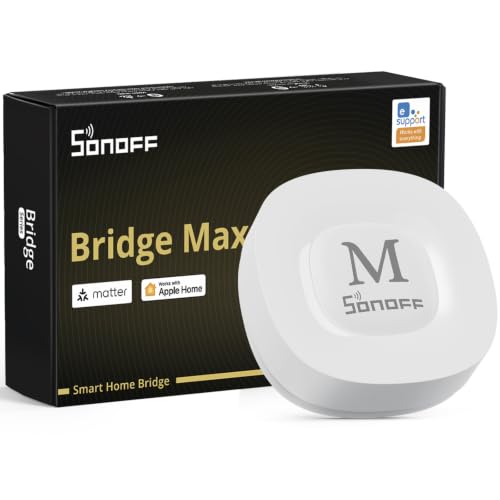
- Bridges Zigbee, BTHome, and eWeLink to Matter
- Local web console with no cloud required
- Supports Home Assistant and local automations
Best For: Users who want a local Matter bridge with Zigbee and Home Assistant support
Easy Start Pick – Home Assistant Green
Home Assistant Green | Smart Home hub with Advanced Automation | Official Home Assistant Hardware
Check Price On AmazonIf you want smart home hubs for home automation without a complicated setup, Home Assistant Green is built to be the easiest entry point into Home Assistant. It ships with Home Assistant already installed, uses a small fanless design, and is meant to give you one local hub to control the whole home.
Best For: Buyers who want an official, plug-and-play Home Assistant hub with local data control.
Pros:
- Home Assistant comes preinstalled, so setup starts with power and Ethernet.
- Official hardware from Nabu Casa with built-in support.
- Small, fanless, silent design with low power use.
- USB expandability for Z-Wave, Zigbee, and Thread devices.
Cons:
- Uses Ethernet rather than built-in wireless as the main connection.
- More advanced connectivity may require extra USB accessories.
Home Assistant Green is a strong choice if you want the Home Assistant platform in a simple, purpose-built box. It focuses on local control, automation flexibility, and keeping your home data at home, while still leaving room to expand later.
Wall Control Pick – Echo Hub
For smart home hubs for home automation that double as a control panel, the Echo Hub is designed around quick access and family-friendly use. Its 8-inch screen lets you arrange devices, launch routines, check cameras, and manage compatible security gear from one dashboard.
Best For: Homes that want a wall-mounted Alexa control panel with broad device support.
Pros:
- Customizable dashboard for devices, routines, cameras, and more.
- Built-in hub supports Wi-Fi, Bluetooth, Zigbee, Matter, Sidewalk, and Thread devices.
- Can be wall mounted or used with a tabletop stand.
- Works with thousands of Alexa-compatible devices.
Cons:
- Some features depend on optional subscriptions or separate accessories.
- Best suited to Alexa-centered homes.
Echo Hub is a practical choice if you want a dedicated smart home dashboard instead of another general-purpose speaker. It combines broad compatibility, simple on-screen control, and easy installation for a cleaner home automation setup.
Long-Range Sensor Pick – YoLink Hub
If your smart home hubs for home automation need to reach farther than usual, the YoLink Hub is built around long-range LoRa connectivity. It acts as the central controller for YoLink devices and is aimed at home security monitoring and broad coverage.
Best For: Users who want a long-range hub for YoLink sensors and security devices.
Pros:
- LoRa-based design for super long range.
- Central controller for YoLink smart home devices.
- Made for home security monitoring and automation.
- Simple wired connection and compact footprint.
Cons:
- Designed specifically for the YoLink ecosystem.
- Does not include battery backup in this version.
YoLink Hub makes sense when range matters more than a broad all-in-one platform. It is a focused bridge for YoLink gear, especially if you want dependable coverage for sensors and security monitoring.
Advanced Local Pick – Hubitat Elevation C-8 Pro
Hubitat Elevation C-8 Pro is one of the more advanced smart home hubs for home automation if you want fast local processing and deep customization. It runs core automations on the hub itself, supports multiple wireless standards, and is aimed at users who want reliable control without a mandatory subscription.
Best For: Power users who want local automations, broad protocol support, and advanced rules.
Pros:
- Local processing for fast response and operation during internet outages.
- Supports Z-Wave, Zigbee, Matter, and Bluetooth devices.
- Advanced automation tools including Visual Rule Builder and Rule Machine.
- No mandatory monthly fee for core features.
Cons:
- Advanced setup may be more involved than simpler hubs.
- Some integrations and features require configuration.
This hub stands out if you care about privacy, reliability, and detailed automation logic. With local control, strong hardware, and wide compatibility, it is built for users who want their smart home to do more on its own.
Top Pick – Lutron hub for Caseta lighting and major ecosystems
For smart home hubs for home automation, the Lutron Caseta Smart Hub is a straightforward choice if you already plan to build around Lutron lighting and accessories. It plugs into your router, connects through the Lutron app, and works with major platforms like Alexa, Apple HomeKit, Google Assistant, Ring, Serena shades, and Sonos. The big advantage here is broad ecosystem support without adding Wi-Fi interference.
Best For: Households that want an easy-to-set-up hub for controlling Lutron Caseta devices across multiple major smart home platforms.
Pros:
- Works with Alexa, Apple HomeKit, Google Assistant, Ring, Serena shades, and Sonos
- Clear Connect Technology avoids interfering with Wi-Fi connected devices
- Simple setup: plug into an outlet, connect to your router, and use the app
- Supports up to 75 Caseta devices for gradual expansion
Cons:
- Designed for Lutron Caseta devices, so it is not a universal hub for every brand
- Coordinating accessories are sold separately
- Alexa voice control for dimming or switching requires Caseta dimmers/switches sold separately
Overall, this hub makes the most sense if your automation plan centers on Lutron lighting and you want strong compatibility with the biggest voice and smart home ecosystems. It is easy to install and simple to scale, but it is best viewed as a focused hub rather than a broad all-in-one controller.
Best for Matter Flexibility – Aqara Matter hub with local automation and Thread
If you want smart home hubs for home automation with modern Matter support, the Aqara Smart Hub M100 stands out for its multi-protocol approach. It works as a Matter Bridge for Aqara Zigbee products, supports Thread devices, and can integrate with Apple Home, Amazon Alexa, and Home Assistant. The hub also supports local automation, which helps keep routines responsive even when Wi-Fi or cloud access is limited.
Best For: Buyers who want a compact Matter-capable hub for Aqara devices and local automation.
Pros:
- Supports Aqara Zigbee and Thread devices, with Matter Bridge functionality
- Compatible with Apple Home, Amazon Alexa, and Home Assistant
- Local automation supports reliable operation without Wi-Fi or cloud access
- Small, flexible design with USB-A power and a 210-degree adjustable shaft
Cons:
- Only supports Aqara Zigbee devices, not third-party Zigbee devices
- Requires a 5V/0.5A power adapter, which is not included
- Some features still depend on cloud connection, such as cloud push notifications
For buyers focused on a future-ready automation hub, the M100 offers a strong mix of Matter bridging, local execution, and compact hardware. Its main limitation is that its Zigbee support is Aqara-specific, so it works best inside an Aqara-centered setup.
Budget Gateway – Tuya Zigbee and Bluetooth Mesh gateway
For shoppers comparing smart home hubs for home automation, this Tuya-focused gateway is a basic option for users already committed to the Smart Life or Tuya ecosystem. It supports Zigbee and Bluetooth Mesh, works over Wi-Fi on the 2.4GHz band, and can be managed through the Smart Life or Tuya Smart app. It also adds Alexa and Google Assistant compatibility for voice control and device grouping.
Best For: Tuya users who want an affordable gateway for Zigbee and Bluetooth Mesh devices.
Pros:
- Supports Zigbee, Bluetooth Mesh, and Wi-Fi control together
- Compatible with Smart Life and Tuya Smart apps
- Works with Alexa and Google Assistant for voice control
- Simple setup with no network cable required
Cons:
- Only compatible with Tuya protocol products
- Not compatible with some devices like bulbs, door locks, and blinds that do not use Tuya protocol
- Requires 2.4GHz Wi-Fi for operation
This gateway is a practical pick if your devices already run on Tuya and you want a simple bridge for app-based control and voice commands. Its narrow compatibility makes it less versatile than broader hubs, but it can be a convenient low-friction option for the right ecosystem.
Local-First Automation – Homey Pro mini Smart Home Hub
If you want one of the more flexible smart home hubs for home automation, the Homey Pro mini is built to centralize control across a wide mix of devices and brands. It supports Zigbee, Matter, Thread, and Ethernet out of the box, while focusing on local processing for faster responses and better reliability even if the internet goes down.
Best For: Homes that want broad device compatibility, local control, and no monthly fee.
Pros:
- Works with 1000+ brands, including Sonos, Philips Hue, Ecobee, LG, Yale, Govee, and TP-Link
- Supports Zigbee, Matter, Thread, and Ethernet out of the box
- Local data processing adds privacy and helps automations keep working when the internet is down
- Homey Flow lets you build simple routines or more advanced workflows in the desktop app
Cons:
- Z-Wave, Bluetooth, and Infrared require the separately sold Homey Bridge
- Advanced customization is more appealing if you are willing to use the desktop app
Overall, the Homey Pro mini is a strong choice if you want a hub that emphasizes local control, broad ecosystem support, and flexible automation without recurring fees.
SmartThings Expansion Hub – Aeotec Smart Home Hub
The Aeotec Smart Home Hub is a practical pick among smart home hubs for home automation if you want a SmartThings-based setup with broad device support. It can link thousands of compatible devices, supports Matter, Zigbee, and Z-Wave Plus on the V3 model, and lets many automations run locally for improved speed and reliability.
Best For: SmartThings users who want a versatile hub with wired or wireless setup options.
Pros:
- Works with thousands of compatible devices from leading brands
- Supports Matter, SmartThings, Zigbee, and Z-Wave Plus on the V3 model
- Many automations now run locally for better speed and reliability
- Easy setup through the SmartThings app on Android, iOS, or iPadOS
Cons:
- Designed for North America
- Full Z-Wave Plus support applies to the V3 model only
If you already use SmartThings, this hub offers a straightforward way to expand into a larger, more capable home automation system with strong protocol support.
Offline Matter Bridge – SONOFF Bridge Max
The SONOFF Bridge Max is a focused option in smart home hubs for home automation if you want to bridge Zigbee, BTHome, and eWeLink devices into Matter platforms. It supports Alexa, Google Home, and Apple Home, while the local web console gives you a no-cloud way to configure and manage the bridge from your LAN.
Best For: Users who want a local Matter bridge with Zigbee support and Home Assistant flexibility.
Pros:
- Bridges Zigbee, BTHome, and eWeLink devices to Matter ecosystems
- Local web console works over LAN without relying on cloud services
- Supports local automations and a Zigbee-based home security setup
- Integrates with Home Assistant through MQTT or bridges devices to Matter-compatible platforms
Cons:
- More of a bridge/gateway than a full all-in-one automation platform
- Best fit depends on whether your devices and ecosystem are already Matter-friendly
For builders who want privacy-focused local control and a clean path into Matter, the Bridge Max is a specialized but capable hub.
How We Picked the Best Smart Home Hubs for Home Automation
We focused on Smart Home Hubs for Home Automation that offer broad device support, dependable connectivity, and practical setup for real homes. Priority went to hubs with strong ecosystem compatibility, local-control options where available, and features that support both beginners and more advanced users.
We also considered protocol support, automation flexibility, voice-assistant compatibility, and whether the hub is best for a small starter setup or a larger multi-room system.
Quick Comparison: What Matters Most
If you want the simplest experience, look for a hub that fits the ecosystem you already use. If you want the best reliability and faster automations, local processing and support for standards like Zigbee, Z-Wave, Matter, and Thread can make a big difference. Some hubs are designed mainly as controllers, while others act as bridges for specific device brands or long-range sensors.
Key Buying Factors for Smart Home Hubs for Home Automation
Compatibility and Protocol Support
Check whether the hub works with your current devices and the protocols they use. Zigbee, Z-Wave, Matter, Thread, Wi-Fi, Bluetooth, and proprietary bridges each solve different problems, so matching the hub to your device mix is essential.
Local Control Vs. Cloud Dependence
Local control can improve speed, privacy, and reliability when your internet connection drops. Cloud-based hubs may be easier to set up, but they can depend more heavily on outside services.
Automation Depth
Some users only need simple schedules and voice commands. Others want advanced rules, conditional logic, presence detection, and device-to-device automations. Choose a hub that can grow with your needs.
Ease of Use and Management
A polished app, clear dashboards, and easy device pairing matter if multiple people in the home will use the system. Simpler hubs can be a better fit for first-time buyers or rooms with just a few devices.
Range and Network Design
For larger homes, consider hubs that support mesh networking, long-range radios, or Ethernet connections for more stable performance. This can be especially important for sensors, locks, and hard-to-reach devices.
Who Should Buy Which Smart Home Hubs for Home Automation?
Choose a local-control or advanced-automation hub if you want maximum flexibility and plan to expand over time. Pick a voice-first or display-based hub if you want easy daily control and quick access to routines. If you already use a specific ecosystem, the best choice is often the one that fits it cleanly rather than the one with the longest feature list.
For Smart Home Hubs for Home Automation, the best purchase is the one that supports your devices today and gives you room to add more tomorrow.
