Managing a large home means more devices, more rooms, and more chances for weak coverage or slow automations. The right hub can simplify everything from lighting and locks to sensors, scenes, and voice control.
Below, we compare 10 of the best options for broader compatibility, stronger automation tools, and reliable performance in bigger spaces.
Best 10 Smart Home Hubs for Large Homes Picks for 2026
Whole-Home Automation Pick
SmartThings Hub 3rd Generation

- Supports Zigbee, Z-Wave, and cloud-to-cloud protocols.
- Controls compatible devices from one smartphone app.
- Built for routines like doors opening and people coming and going.
Best For: households that want broad compatibility and simple whole-home automation
Local Control Pick

- Home Assistant is preinstalled for quick start.
- Centralizes whole-home control and reduces app clutter.
- USB expandability supports Z-Wave, Zigbee, and Thread.
Best For: users who want local-first control and advanced automation with expansion options
Wall-Mounted Dashboard Pick

- 8-inch customizable smart home control panel.
- Works with thousands of Alexa-compatible devices.
- Wall-mountable for shared whole-home access.
Best For: families that want a shared wall-mounted control panel for everyday smart home use
Long-Range Reliability Pick

- LoRa range reaches devices up to 1/4 mile away.
- Runs synced automations locally for fast response.
- Supports a Local API for local integrations.
Best For: large properties and users who prioritize long-range coverage and local automation
Professional Local Control Hub
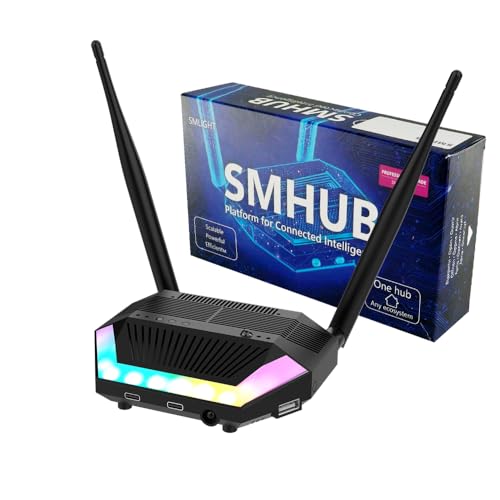
- Runs Zigbee2MQTT, Matterbridge, and MQTT locally
- Built-in Zigbee, Thread, Wi-Fi, and Bluetooth
- Can reduce the need for separate bridges and servers
Best For: Large homes that need flexible local control and broad protocol support
SmartThings Gateway Pick

- Supports Zigbee, Z-Wave, Matter, Wi-Fi, Alexa, and Google Home
- Many automations run locally for speed and reliability
- Works with Ethernet or Wi-Fi setup
Best For: Large homes that want a SmartThings-compatible hub with broad device support
Privacy-Focused All-in-One Hub

- Local processing for privacy and reliability
- Supports Zigbee, Matter, Thread, and Ethernet
- Works with 1000+ brands and Homey Flow
Best For: Users who want local control, broad brand support, and no subscription
Whole-Home Command Center
SwitchBot Hub 3 for Matter, IR & Family Control

- Handles 100,000+ IR appliances and SwitchBot devices
- Built-in screen, dial, and scene buttons simplify control
- Works with Alexa, Google, Apple Home, and Matter devices
Best For: Families wanting a simple, visible control hub for lots of everyday devices
Multi-Protocol Automation Hub
Homey Pro for Advanced Whole-Home Control

- Supports Wi-Fi, Zigbee, Z-Wave Plus, BLE, IR, Matter, and Thread
- Works with 50,000+ devices from 1,000+ brands
- Local-first design and advanced Flow automations
Best For: Power users managing a large, mixed-device smart home
Local Automation Powerhouse
Hubitat Elevation C-8 Pro for Reliable Control

- Local processing keeps automations fast and private
- Supports Z-Wave, Zigbee, Matter, and Bluetooth
- No mandatory subscription and strong advanced rules
Best For: Large homes that need reliable, highly customizable automations
Whole-Home Automation Pick – SmartThings Hub 3rd Generation
If you want one of the most flexible smart home hubs for large homes, the SmartThings Hub 3rd Generation is built to bring many compatible devices into a single app. It supports Zigbee, Z-Wave, and cloud-to-cloud protocols, making it a practical choice when you need broad device coverage across multiple rooms.
Best For: Households that want broad compatibility and simple whole-home automation from one hub.
Pros:
- Works with Zigbee, Z-Wave, and cloud-to-cloud protocols for wide device support.
- Lets you monitor and control compatible devices from a single smartphone app.
- Supports automations like turning devices on or off when doors open or people come and go.
- Compatible with Alexa and Google Home.
Cons:
- Designed around compatible devices, so your current setup may not be fully supported.
- Requires a smartphone app for management.
- Uses battery power, which may matter depending on placement needs.
For a large home with lots of mixed smart devices, this hub stands out for its broad protocol support and straightforward automation tools. It’s a solid central controller if you want to reduce app switching and keep routines organized.
Local Control Pick – Home Assistant Green
Home Assistant Green | Smart Home hub with Advanced Automation | Official Home Assistant Hardware
Check Price On AmazonHome Assistant Green is a strong option among smart home hubs for large homes if you want one hub to control the whole house with advanced automation. It comes with Home Assistant already installed, and the fanless design keeps it compact and silent while handling whole-home control.
Best For: Users who want local-first control, advanced automation, and room to expand with add-on radios.
Pros:
- Home Assistant is already installed, so setup starts with power and Ethernet.
- Controls the whole home from one hub and reduces hub and app clutter.
- Fanless, silent design with a quad-core processor, 32GB storage, and 4GB RAM.
- USB expandability supports Z-Wave, Zigbee, and Thread devices.
Cons:
- Expansion for Z-Wave, Zigbee, and Thread requires separate USB devices.
- Initial setup depends on Ethernet and included power supply.
- Best suited to users comfortable with Home Assistant’s more advanced approach.
For larger homes, this hub is appealing because it centralizes control while keeping your data at home. Its expansion options make it a flexible foundation if you expect your system to grow over time.
Wall-Mounted Dashboard Pick – Amazon Echo Hub
The Amazon Echo Hub is a practical smart home hub for large homes when you want a dedicated wall-mounted control panel instead of relying only on a phone. Its customizable dashboard makes it easy to organize devices, view cameras, and start routines from a central spot in the house.
Best For: Families that want a shared, easy-to-use control panel for lights, cameras, routines, and security.
Pros:
- 8-inch control panel with a customizable dashboard.
- Works with thousands of Alexa-compatible WiFi, Bluetooth, Zigbee, Matter, Sidewalk, and Thread devices.
- Can be wall mounted and hide cables with optional install accessories.
- Supports arming/disarming compatible security systems and on-screen media controls.
Cons:
- Power-over-Ethernet adapter and some mounting accessories are sold separately.
- Full camera event summaries require an Alexa+ and compatible Ring subscription.
- Best as a control panel, not a general-purpose hub for every smart-home setup.
This is a good fit for larger homes where multiple people need fast access to common controls. The wall-mounted layout can make everyday routines simpler, especially near entries or central living areas.
Long-Range Reliability Pick – YoLink Local Hub
YoLink Local Hub is aimed at smart home hubs for large homes where long range and local reliability matter. Its LoRa-based connection reaches devices up to 1/4 mile away, and once automations are synced, it can run them locally even if the internet drops.
Best For: Large properties and users who prioritize long-range device coverage and local automation.
Pros:
- LoRa technology supports devices up to 1/4 mile away.
- Local automations continue to function even if the external internet goes down.
- Supports a Local API for integration with local control centers like Home Assistant.
- Can connect by Ethernet or WiFi for flexible setup.
Cons:
- Internet is required for initial setup, provisioning, and editing local rules.
- Router or switch must stay powered for local access during outages.
- Primarily designed around YoLink devices and local integrations.
If your main challenge is reaching devices across a large property, this hub has a real advantage. It’s especially useful when you want local execution and low latency without depending on cloud response times.
Professional Local Control Hub – SMLIGHT SMHUB Essential
If you’re comparing smart home hubs for large homes, the SMLIGHT SMHUB Essential is built for people who want local control and fewer moving parts. It combines Zigbee, Thread, Wi-Fi, and Bluetooth in one Linux-based hub, with the ability to run tools like Zigbee2MQTT, Matterbridge, MQTT broker, Node-RED, WireGuard, and Tailscale directly on the device.
Best For: Large homes that need a flexible, locally run hub that can reduce dependence on separate bridges and servers.
Pros:
- Runs open-source apps locally for stability and control.
- Can expose Zigbee devices directly to Google Home or Apple Home through Zigbee2MQTT and Matterbridge.
- Built-in multi-radio support: Zigbee, Thread, Wi-Fi, and Bluetooth.
- Peripheral-rich design includes IR receiver/transmitter, buzzer, service LEDs, audio out, and storage options.
Cons:
- Full functionality may require optional expansion modules.
- More advanced than a simple plug-and-play hub.
For larger smart homes, this hub stands out if you want to centralize integrations and keep core automation running locally even when a main server goes down. It is especially appealing if you want one device to handle several roles instead of adding more dongles and bridges.
SmartThings Gateway Pick – Aeotec Smart Home Hub
For buyers shopping smart home hubs for large homes, the Aeotec Smart Home Hub is a practical gateway for connecting a wide range of devices through SmartThings. It supports Z-Wave, Zigbee, Matter, Wi-Fi, Alexa, and Google Home, and it offers both Ethernet and Wi-Fi setup for easier placement in the home.
Best For: Homes that want a straightforward SmartThings-based hub with broad compatibility and wired or wireless networking.
Pros:
- Works as a SmartThings Hub with support for thousands of compatible devices.
- Supports Matter, Z-Wave Plus, Zigbee, Wi-Fi, Alexa, and Google Home.
- Many automations run locally for better speed and reliability.
- Easy setup with either Ethernet or Wi-Fi.
Cons:
- Designed for use in North America.
- Z-Wave Plus support applies to the V3 model only.
This is a strong choice if you want a familiar app-based experience and a hub that can coordinate a lot of compatible devices across a larger property. It leans more toward convenience and ecosystem compatibility than deep local app hosting.
Privacy-Focused All-in-One Hub – Homey Pro mini
If you want smart home hubs for large homes with a strong focus on local control, the Homey Pro mini is designed to manage devices from one place while keeping processing local. It supports Zigbee, Matter, Thread, and Ethernet out of the box, and it can expand further with the separate Homey Bridge for Z-Wave, Bluetooth, and Infrared.
Best For: Users who want a privacy-first hub with local processing, strong automation tools, and broad brand support.
Pros:
- Local data processing helps with privacy and reliability, even when the internet is down.
- Homey Flow supports both simple routines and more advanced workflows.
- Works with 1000+ brands and supports official plus community-developed apps.
- No subscription required, including cloud services and voice assistant integrations.
Cons:
- Z-Wave, Bluetooth, and Infrared require the separately sold Homey Bridge.
- Some advanced customization may be better suited to users comfortable with automation builders.
The Homey Pro mini is a compelling option if you want one hub to coordinate a wide ecosystem while keeping core processing local. It is especially attractive if you value secure backups and a subscription-free model for a larger smart home setup.
Whole-Home Command Center – SwitchBot Hub 3 for Matter, IR & Family Control
If you want smart home hubs for large homes that can bring a lot of devices into one place, SwitchBot Hub 3 is built around consolidation. It handles 100,000+ infrared appliances, SwitchBot accessories, and Matter-compatible third-party products, while also giving you physical controls and a live status screen for quick checks around the house.
Best For: Households that want an easy-to-use, all-in-one hub for infrared devices, SwitchBot gear, and basic whole-home scene control.
Pros:
- Supports 100,000+ IR appliances plus SwitchBot devices and Matter-compatible products
- Built-in 2.4" IPS screen shows temperature, humidity, weather, alerts, and status at a glance
- Dial and buttons make temperature, lighting, and scene control more accessible for family members
- Works with Alexa, Google Assistant, Apple Home, and the SwitchBot app
Cons:
- Requires a 2.4GHz Wi-Fi connection for setup and stable use
- Supports infrared devices only, not RF devices like ceiling fans or garage door openers
- Some advanced features depend on the wider SwitchBot ecosystem
For a large home that has a mix of remotes, smart accessories, and automation scenes, Hub 3 is attractive because it keeps everyday control simple. It is less of a deep tinkerer’s hub than some alternatives, but it delivers a practical front-end for broad, family-friendly control.
Multi-Protocol Automation Hub – Homey Pro for Advanced Whole-Home Control
For smart home hubs for large homes, Homey Pro stands out when you need broad device support across many rooms and technologies. It combines Wi-Fi, Zigbee, Z-Wave Plus, BLE, infrared, Matter, and Thread in one local-first hub, so it is built to unify a complex setup without leaning heavily on the cloud.
Best For: Tech-savvy homeowners who want a highly flexible, local-first hub with wide protocol support and powerful automation tools.
Pros:
- Supports seven technologies: Wi-Fi, Zigbee, Z-Wave Plus, infrared, BLE, Matter, and Thread
- Works with 50,000+ devices from 1,000+ brands, including major smart home ecosystems
- Homey Flow and Advanced Flows offer powerful automation options in app or web app
- Local processing keeps control on the hub with minimal cloud dependency
Cons:
- Advanced setup may be more demanding than simpler plug-and-play hubs
- Compatibility varies by device and may require checking the Homey website
- Best features are aimed more at enthusiasts than casual users
If your home spans many brands, room types, and device protocols, Homey Pro offers the kind of flexibility that large households often need. It is especially appealing when you want strong automations and local control without having to rebuild your entire smart home from scratch.
Local Automation Powerhouse – Hubitat Elevation C-8 Pro for Reliable Control
Hubitat Elevation C-8 Pro is a strong fit if you are comparing smart home hubs for large homes and care most about local processing, reliability, and advanced automation. It runs core automations on the hub itself, so lights, locks, sensors, and routines can keep working even if the internet goes down.
Best For: Users who want a private, highly customizable hub with fast local automations and broad multi-protocol support.
Pros:
- Local processing delivers fast response and keeps core automations working during internet outages
- Supports Z-Wave 800, Z-Wave Long Range, Zigbee 3.0, Matter 1.5, and Bluetooth devices
- No mandatory monthly subscription for core hub features
- Advanced tools like Visual Rule Builder and Rule Machine support complex automations
Cons:
- May be better suited to experienced users who want deeper customization
- Some integrations and features require configuration and compatibility checks
- Not as visually simple as hubs focused on screen-based everyday control
For larger homes with many sensors, switches, and routines, Hubitat is compelling because it prioritizes speed and control over polish. If you want a hub that can scale into sophisticated automation without a subscription, it is one of the more serious options here.
How We Picked the Best Smart Home Hubs for Large Homes
We focused on Smart Home Hubs for Large Homes that can handle many connected devices without becoming hard to manage. Priority went to hubs with broad protocol support, strong automation features, dependable local control, and flexible integration with popular platforms like Alexa, Google Assistant, Apple Home, Zigbee, Z-Wave, Matter, Thread, Wi-Fi, and Ethernet.
Quick Comparison
For large homes, the biggest differences usually come down to connection range, network architecture, and automation style. Some hubs are best for wide device compatibility, while others excel at local processing, advanced rules, or centralized control panels. If your home has multiple floors, detached areas, or a mix of brands, protocol support matters as much as app design.
Key Buying Factors for Smart Home Hubs for Large Homes
Coverage and Connectivity
Look for Ethernet when possible, especially if your hub will sit far from the router or manage lots of traffic. Mesh-friendly protocols like Zigbee, Thread, and Z-Wave can help extend reach through supported devices, while Wi-Fi-only setups may be easier but less resilient in bigger layouts.
Local Control Vs. Cloud Dependence
Local automations can stay responsive even if your internet slows down. That is especially useful for lighting, security, and routines in Smart Home Hubs for Large Homes where reliability matters. Cloud features may still be useful, but local execution often improves speed and consistency.
Device and Platform Compatibility
Check support for the devices you already own and the brands you expect to add later. Matter can help future-proof your setup, while Zigbee and Z-Wave remain valuable for sensors, switches, and older accessories. If voice assistants matter, make sure the hub integrates cleanly with the ecosystem you use most.
Automation Depth and Ease of Use
Some buyers want simple dashboards and scenes; others want powerful conditional logic, scripting, or advanced routines. The best hub for you depends on whether you want quick setup or deeper customization across many rooms and devices.
Who Should Buy Which Smart Home Hubs for Large Homes?
If you want the simplest, most consumer-friendly experience, choose a hub with strong app guidance and broad mainstream compatibility. If you have a mixed-brand system or plan to expand over time, favor hubs with Zigbee, Z-Wave, Thread, Matter, or local automation support. Power users and larger properties often benefit most from hubs that support Ethernet, advanced rules, and local-first control.
In short, the best Smart Home Hubs for Large Homes are the ones that match your existing devices, your preferred ecosystem, and the level of automation control you actually want to manage every day.
