Smart home hubs can do more than connect devices—they can make remote control simple, reliable, and secure from anywhere. The right hub depends on your devices, automation needs, and how much local control you want.
In this roundup of the best smart home hubs for remote access, we focus on compatibility, app experience, protocol support, and the features that matter most for everyday use.
Best 10 Smart Home Hubs for Remote Access Picks for 2026
Official Home Assistant Starter Hub

- Home Assistant OS preinstalled for quick setup
- Local data storage with advanced automation
- USB expansion for Z-Wave, Zigbee, and Thread
Best For: People who want official Home Assistant hardware with local control
Universal IR Hub With Alarm

- Matter-certified IR and IoT hub
- Remote access in the Tapo app
- Controls 8,000+ brands across 18 appliance types
Best For: Homes that need a universal remote hub with app control
Multi-Platform Lighting Bridge

- Integrates with Alexa, Apple, Google, Ring, and more
- Easy router-based setup with app control
- Supports up to 75 Caseta devices
Best For: Households centered on Caseta lighting and shades
Budget IR Learning Hub

- Controls 50,000+ IR devices
- Learns buttons from your original remote
- Works with Alexa, Google Home, and IFTTT
Best For: Users who need an affordable IR-only remote hub
SmartThings-Ready Whole-Home Hub

- Supports Matter, Z-Wave, Zigbee, Wi‑Fi, Alexa, and Google Home.
- Manages devices and automations in the SmartThings app.
- Many automations run locally for improved speed and reliability.
Best For: Users who want broad device compatibility and app-based remote control.
Universal IR/RF Remote Hub

- Controls 38KHz IR devices and 433MHz fixed-code RF devices.
- Works with Alexa, Google Assistant, IFTTT, and Siri.
- App includes timers, scenes, routines, and room sensing.
Best For: People who want remote control for TVs, ACs, blinds, and similar devices.
Local Automation Power Hub

- Runs core automations locally for speed and reliability.
- Supports Z-Wave 800, Zigbee 3.0, Matter 1.5, and Bluetooth.
- No mandatory monthly subscription for core features.
Best For: Advanced users who want deep control, local automations, and broad device support.
Easy IR Control for a Simple Smart Home
SwitchBot Hub Mini Smart Remote
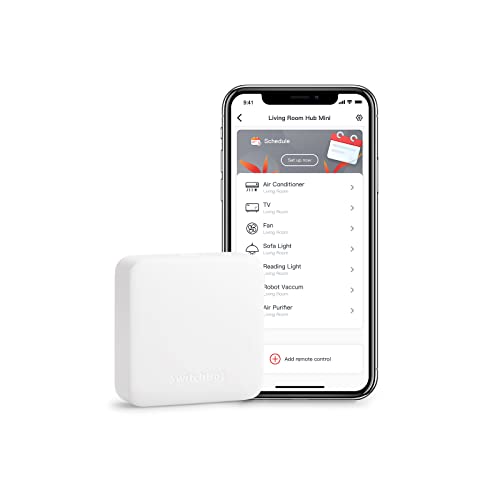
- Controls IR appliances from one app
- Smart learning copies remotes in seconds
- Works with Alexa, Google, Siri, and IFTTT
Best For: Affordable remote access for TVs and air conditioners
Remote Lock Access Made Easier

- Adds Wi‑Fi access to compatible Bluetooth smart locks
- Supports remote unlock, alerts, and activity logs
- Works with Alexa and Google Home
Best For: Compatible smart lock owners who need remote door control
Climate-Aware Hub with Remote Control

- Controls IR appliances remotely
- Monitors temperature, humidity, and light
- Supports Alexa, Google Home, Apple Home, and Matter
Best For: Remote control users who want climate-based automations
Official Home Assistant Starter Hub – Home Assistant Green
Home Assistant Green | Smart Home hub with Advanced Automation | Official Home Assistant Hardware
Check Price On AmazonIf you want smart home hubs for remote access that keep your data local, Home Assistant Green is an easy entry point. It ships with Home Assistant OS already installed, so setup is mostly a matter of plugging in power and Ethernet, then managing automations and devices from one central hub.
Best For: Users who want official Home Assistant hardware with local control and advanced automation.
Pros:
- Preinstalled Home Assistant OS makes startup straightforward.
- Official hardware from Nabu Casa with fanless, low-power design.
- Supports USB expansion for Z-Wave, Zigbee, and Thread add-ons.
- Keeps home data stored locally on the device.
Cons:
- Uses Ethernet rather than built-in Wi-Fi for connectivity.
- Expansion accessories are sold separately.
For buyers who prioritize local data storage and flexible automation, Green is a strong foundation. It is especially appealing if you want one hub to consolidate multiple smart home functions without adding app clutter.
Universal IR Hub With Alarm – Tapo H110 Matter Hub
This is one of the more versatile smart home hubs for remote access if you need to control both modern and legacy appliances. The Tapo H110 works as a Matter-certified IR and IoT hub, giving you app control for TVs, ACs, fans, and other devices within IR range, plus automation and voice assistant support.
Best For: Homes that need a universal remote hub for appliances plus remote app access.
Pros:
- Controls 8,000+ brands and 18 appliance types.
- Remote access through the Tapo app on iOS or Android.
- Works with Alexa, Google Assistant, and Siri through Matter.
- Includes a built-in 93 dB alarm for Tapo sensor alerts.
Cons:
- IR control requires devices to be within range.
- Only supports 2.4 GHz Wi-Fi.
If your goal is to unify several remotes and manage appliances from anywhere, the H110 is a practical pick. Its broad compatibility and schedule tools make it especially useful for everyday comfort and energy control.
Multi-Platform Lighting Bridge – Lutron Caseta Smart Hub
If your search for smart home hubs for remote access is focused on lighting and broad platform support, the Lutron Caseta Smart Hub is a dependable choice. It connects to your router, works with the Lutron app, and integrates with major ecosystems so you can manage compatible Caseta devices through voice assistants and automations.
Best For: Households centered on Caseta lighting, shades, and multi-platform integration.
Pros:
- Works with Alexa, Apple HomeKit, Google Assistant, Ring, Serena shades, and Sonos.
- Simple setup: plug into an outlet, connect to the router, and use the app.
- Supports up to 75 Caseta devices.
- Clear Connect technology avoids interference with Wi-Fi devices.
Cons:
- Designed for Caseta devices rather than broad third-party device control.
- Accessories sold separately.
For buyers already using Caseta dimmers, switches, or shades, this hub is a clean way to centralize control. It is less of a universal hub and more of a stable bridge for a specific lighting ecosystem.
Budget IR Learning Hub – BroadLink RM4 Mini
The BroadLink RM4 Mini is a compact option for smart home hubs for remote access when you mainly need infrared control. It supports a large library of IR devices, lets you learn buttons from your original remote, and works with voice ecosystems for convenient control of compatible appliances.
Best For: Users who want an affordable IR-only hub for TVs, ACs, and similar gear.
Pros:
- Supports 50,000+ IR-controlled devices.
- Built-in remote library plus custom learning from your original remote.
- Works with Alexa, Google Home, and IFTTT.
- Compact and focused on simple IR automation.
Cons:
- IR only; no Bluetooth, Zigbee, or RF support.
- Requires line of sight to control appliances.
This is a straightforward pick if your devices are infrared-based and you want app control without extra complexity. It is best viewed as a dedicated remote replacement rather than a full multi-protocol smart hub.
SmartThings-Ready Whole-Home Hub – Aeotec Smart Home Hub
If you want smart home hubs for remote access that can bring multiple device types into one app, the Aeotec Smart Home Hub is built around the SmartThings ecosystem. It supports Matter, Z-Wave, Zigbee, Wi‑Fi, Alexa, and Google Home, and it lets you set up, manage, and automate devices through the SmartThings app on Android, iOS, or iPadOS. Many automations also run locally for faster, more reliable operation.
Best For: Households that want a broad-compatibility hub for app-based control and routines across mixed smart devices.
Pros:
- Works with thousands of compatible devices across major smart home platforms.
- Supports Matter, Z-Wave Plus, Zigbee, Wi‑Fi, Alexa, and Google Home.
- Lets you build custom automations in the SmartThings app.
- Offers Wi‑Fi or Ethernet setup for flexible installation.
Cons:
- Designed for use in North America.
- Z-Wave Plus support is limited to the V3 model.
For buyers prioritizing remote access through a mainstream app, this hub stands out for its wide compatibility and easy setup. The local automation support is a useful bonus if you want routines that respond more quickly and depend less on the cloud.
Universal IR/RF Remote Hub – Broadlink RM4 Pro
For smart home hubs for remote access focused on entertainment and appliance control, the Broadlink RM4 Pro turns your phone into a remote for IR and RF devices. It works with 38KHz IR gear like TVs, ACs, and fans, plus 433MHz fixed-code RF devices such as curtains, blinds, and some light switches. The BroadLink app also supports timers, scenes, and routines so you can automate everyday controls from anywhere at home or away.
Best For: Homes that need remote control of TVs, ACs, fans, blinds, and other IR/RF devices.
Pros:
- Supports both IR and 433MHz fixed-code RF control.
- Works with Alexa, Google Assistant, IFTTT, and Siri.
- Can create timers, scenes, and routines in the app.
- Includes external temperature and humidity sensing for room-based triggers.
Cons:
- Requires a stable 2.4GHz Wi‑Fi network.
- Does not support 5GHz or mesh networks.
- RF compatibility is limited to fixed-code 433MHz devices, not rolling code.
This is a practical choice if your main goal is remote access to appliance-style devices rather than a full multi-protocol smart home platform. Its broad IR/RF support and app-based control make it especially handy for simplifying everyday home electronics.
Local Automation Power Hub – Hubitat Elevation C-8 Pro
If you’re comparing smart home hubs for remote access and reliability, the Hubitat Elevation C-8 Pro is built for fast local control. Core automations run on the hub itself, which helps keep response times quick and lets compatible lights, switches, locks, sensors, and thermostats continue working even during an internet outage. It also supports advanced automation tools for users who want more control over how their system behaves.
Best For: Users who want a highly customizable hub with local automations and broad protocol support.
Pros:
- Processes core automations locally for speed, privacy, and reliability.
- Supports Z-Wave 800, Z-Wave Long Range, Zigbee 3.0, Matter 1.5, and Bluetooth devices.
- Works with 1,000+ compatible devices across 100+ brands.
- No mandatory monthly subscription for core features.
Cons:
- Some features and integrations may require configuration.
- Advanced automation tools may be more than casual users need.
This hub is a strong pick if you want remote access backed by local processing and deep automation flexibility. The mix of multi-protocol support, ongoing updates, and no required subscription makes it a compelling long-term platform for serious smart home users.
Easy IR Control for a Simple Smart Home – SwitchBot Hub Mini Smart Remote
If you want one of the most practical smart home hubs for remote access, the SwitchBot Hub Mini is a simple way to bring IR appliances online without adding a lot of complexity. It works with 2.4GHz Wi‑Fi, can learn existing remotes in seconds, and lets you control compatible TVs, air conditioners, and other infrared devices from the SwitchBot app.
Best For: Users who want an affordable IR blaster hub for controlling everyday appliances remotely.
Pros:
- Supports remote control of TVs, air conditioners, and other infrared appliances in one app.
- Smart learning mode can mimic an existing remote quickly.
- Works with Alexa, Google Assistant, Siri, and IFTTT for voice control.
- USB-powered and portable, so it is easy to place where needed.
Cons:
- Requires 2.4GHz Wi‑Fi; 5GHz is not supported.
- IR performance can be affected by walls, metal objects, or poor line of sight.
- Primarily suited to infrared appliances rather than broad smart-device control.
Overall, the Hub Mini is a straightforward pick if your main goal is remote access to legacy IR devices. It is best when you want a compact bridge for a few key appliances and plan to stay within the SwitchBot ecosystem.
Remote Lock Access Made Easier – GHome Smart G2B WiFi Gateway
For smart home hubs for remote access focused on door security, the GHome Smart G2B WiFi Gateway is built to connect compatible Bluetooth smart locks to Wi‑Fi. That gives you remote unlock access, passcode management, status checks, and activity alerts through the GHome or Tuya app, which is useful if you need to manage a lock while away from home.
Best For: Owners of compatible GHome or Tuya Bluetooth locks who want remote unlock and monitoring.
Pros:
- Turns compatible Bluetooth smart locks into Wi‑Fi-connected locks.
- Enables remote access, remote unlock, and passcode management in the app.
- Provides real-time notifications, activity logs, and battery monitoring.
- Supports both 2.4GHz and 5GHz Wi‑Fi for more flexible setup.
Cons:
- Designed for compatible GHome locks and selected Tuya Bluetooth devices only.
- Not a general-purpose hub for controlling all home appliances.
- Feature value depends on whether your existing lock is supported.
This gateway is a strong fit if your priority is secure door control rather than whole-home automation. It adds the remote features many Bluetooth locks lack, while staying relatively simple to install and use.
Climate-Aware Hub with Remote Control – SwitchBot Hub 2 (2nd Gen)
The SwitchBot Hub 2 is a more advanced option among smart home hubs for remote access because it combines IR control with temperature, humidity, and light monitoring. If you want a hub that can both manage appliances from anywhere and help automate them based on room conditions, this model adds more flexibility than a basic bridge.
Best For: Users who want remote control plus environmental sensing for smarter automation.
Pros:
- Controls infrared devices like TVs and air conditioners through the SwitchBot app.
- Built-in temperature, humidity, and light sensors can be checked remotely.
- Supports scenes and geofencing based on environmental data.
- Works with Alexa, Google Home, Apple Home, and Matter-supported SwitchBot devices.
Cons:
- Requires 2.4GHz Wi‑Fi for hub connectivity.
- Has a stated maximum of 6 supported devices.
- Some Matter support is limited to specific SwitchBot products.
For buyers who want more than basic remote appliance access, the Hub 2 offers a useful blend of control and sensing. It is especially appealing if you want automation triggers tied to room conditions and prefer a hub with broader platform support.
How We Picked the Best Smart Home Hubs for Remote Access
We prioritized hubs that make remote access practical, not just possible. That means strong app support, broad ecosystem compatibility, dependable connectivity, and enough protocol coverage to manage common smart devices without constant workarounds.
We also weighed setup simplicity, automation depth, and whether the hub supports local processing or cloud access. For many buyers, the best Smart Home Hubs for Remote Access are the ones that balance convenience with control.
Quick Comparison
Choose a hub based on what you need to manage: IR-only devices like TVs and air conditioners, multi-protocol smart home setups with Zigbee, Z-Wave, or Matter, or brand-specific ecosystems such as Lutron or SwitchBot. If you want broad compatibility, look for a hub that can bridge multiple device types. If you want faster automations and fewer internet dependencies, local control matters more.
Key Buying Factors for Smart Home Hubs for Remote Access
Device Compatibility
Make sure the hub works with your existing devices and platform of choice, whether that is Alexa, Google Home, Apple Home, SmartThings, or a dedicated app. Compatibility is especially important if you are building a mixed-brand setup.
Protocol Support
Different hubs support different standards. IR blasters are useful for entertainment gear and HVAC control, while Zigbee, Z-Wave, Matter, Bluetooth, and Wi-Fi expand what you can connect. The best fit depends on the devices you already own and what you plan to add later.
Remote Access and Reliability
For Smart Home Hubs for Remote Access, the app should be responsive and easy to use away from home. Check whether remote functions require cloud services, and consider whether the hub still offers meaningful local operation if your internet goes down.
Automation and Control Depth
Some hubs are built for simple remote toggles, while others support advanced routines, sensors, scenes, and conditional automations. If you want your home to respond automatically, choose a hub with stronger automation tools.
Who Should Buy Which Smart Home Hubs for Remote Access?
If you want an all-around hub for mixed-device control, choose a multi-protocol option with strong ecosystem support. If your focus is TVs, AV gear, or air conditioners, an IR-focused hub is usually the best value. If you care most about privacy, speed, and fewer cloud dependencies, pick a hub with robust local control. And if your devices come mostly from one brand, a brand-specific hub may offer the smoothest setup and best day-to-day remote access experience.
