In 2026, the demand for low latency audio interfaces is stronger than ever, catering to musicians and podcasters who need flawless sound quality. You’ll find numerous models that promise seamless performance, but not all of them deliver. From the Focusrite Scarlett Solo to the MOTU M2, each interface brings unique features to the table. So, what should you consider when choosing the right one for your setup?
Focusrite Scarlett Solo 3rd Gen USB Audio Interface

The Focusrite Scarlett Solo 3rd Gen USB Audio Interface is an ideal choice for solo musicians, podcasters, and content creators who demand high-quality recordings without the hassle of complicated setups. Its high-performing mic pre-amps brighten your recordings, while the switchable Air mode adds clarity to acoustic instruments. With two high-headroom instrument inputs, you’ll capture your guitar and bass sounds without clipping or distortion. Experience professional-quality recordings at up to 24-bit/192kHz, ensuring low noise for crystal-clear playback. Plus, it comes bundled with essential software like Pro Tools Intro+ and Ableton Live Lite, so you can start creating immediately. Enjoy a three-year warranty for peace of mind!
Best For: Solo musicians, podcasters, and content creators seeking high-quality recordings with a user-friendly interface.
Pros:
- High-performing mic pre-amps enhance recording brightness and clarity.
- Supports professional-quality recordings up to 24-bit/192kHz for crystal-clear playback.
- Includes a comprehensive software bundle for immediate music creation and editing.
Cons:
- Limited to two inputs, which may not be suitable for larger recording setups.
- Some users may find the bundled software lacks advanced features compared to professional versions.
- Requires USB power, which may necessitate a powered USB hub for certain setups.
M-AUDIO M-Track Solo USB Audio Interface for Recording and Streaming

For musicians and content creators seeking an affordable yet high-quality solution, the M-AUDIO M-Track Solo USB Audio Interface is an excellent choice. It’s designed for recording, streaming, and podcasting, with compatibility for both Mac and PC. Enjoy 48kHz audio resolution for pristine sound. You’ll find one combo XLR/Line input with phantom power and one Line/Instrument input, perfect for capturing vocals or guitar. Its transparent Crystal Preamp guarantees peak sound quality. Plus, the USB/Direct switch allows for zero latency monitoring, while the included MPC Beats Software enhances your production capabilities. It’s a powerful tool for anyone serious about audio.
Best For: Musicians and content creators looking for an affordable, high-quality audio interface for recording, streaming, and podcasting.
Pros:
- High audio resolution at 48kHz ensures clear and professional sound quality.
- Versatile input options with one combo XLR/Line input and one Line/Instrument input for various recording needs.
- Zero latency monitoring with the USB/Direct switch for real-time audio feedback during recording.
Cons:
- Limited input options with only two inputs, which may not be sufficient for multi-instrument recordings.
- Basic software included may not meet the needs of advanced users seeking more complex production tools.
- No MIDI input/output, potentially limiting connectivity for MIDI devices and instruments.
Fender Quantum LT 4 USB-C Audio Interface
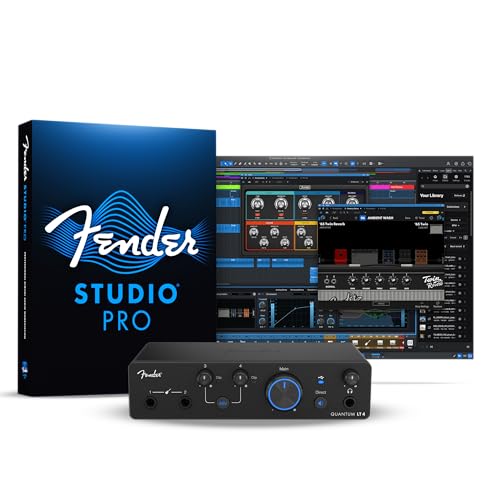
Designed with musicians in mind, the Fender Quantum LT 4 USB-C audio interface stands out for its dual MAX-HD mic preamps, delivering an impressive 75 dB of gain. With four inputs and two outputs, it’s perfect for recording guitars, basses, and a variety of microphones. You’ll enjoy low-latency drivers and loopback functionality, making streaming and podcasting seamless. The balanced TRS outputs and powerful headphone amp guarantee exceptional monitoring. Plus, easy registration through My Fender grants a 6-month trial of Fender Studio Pro. Compatible with both Mac and PC, this interface is a top choice for any music production setup.
Best For: Musicians and content creators looking for a versatile, high-quality audio interface for recording and streaming.
Pros:
- Dual MAX-HD mic preamps provide up to 75 dB of gain for superior sound quality.
- Low-latency drivers and loopback functionality make it ideal for seamless streaming and podcasting.
- User-friendly registration with My Fender includes a 6-month trial of Fender Studio Pro, enhancing the user experience.
Cons:
- Limited to 4 inputs and 2 outputs, which may not suffice for larger recording setups.
- The weight of 1.8 pounds may be less portable for some users.
- Compatibility issues may arise with certain older devices or software.
MAONO USB Audio Interface for PC (PS22 Lite Black)

With high-resolution recording capabilities of 24-bit/192kHz and a dynamic range of 106dB, the MAONO USB Audio Interface PS22 Lite is perfect for recording enthusiasts and streamers who demand clarity and realism in their audio. It’s compatible with both PC and Mac, making it versatile for various setups. You can easily connect condenser and dynamic microphones, thanks to its 56 dB preamp and 48V phantom power. Plus, the compact design fits in your hand, while the included ProStudio Routing Software enhances your streaming experience. Enjoy seamless integration with popular DAWs and stay focused on creating stunning audio content.
Best For: Recording enthusiasts and streamers seeking high-quality audio with user-friendly features for both PC and Mac.
Pros:
- High-resolution recording at 24-bit/192kHz for superior sound quality.
- Compact and portable design, making it easy to use on the go.
- Compatible with popular DAWs and includes ProStudio Routing Software for enhanced streaming capabilities.
Cons:
- Limited to USB connectivity, which may not suit all users’ setups.
- May require additional accessories for optimal microphone performance.
- Some users may find the software setup process challenging.
XTUGA USB Audio Interface for PC

The XTUGA USB Audio Interface is a game-changer for musicians and producers looking to capture studio-quality recordings without breaking the bank. With its XLR input and 3.5mm microphone jack, you can easily record vocals, guitar, and bass. The high-performance converter supports up to 16-bit/48 kHz audio, ensuring ultra-low latency for real-time monitoring. You’ll appreciate the +48V phantom power for mics and the front panel preamp that offers independent volume control. Plus, the gain halo meter helps you avoid clipping, so your recordings maintain pristine quality. Whether you’re a beginner or pro, this interface makes music creation a breeze.
Best For: Musicians and producers seeking an affordable solution for high-quality audio recordings.
Pros:
- High-performance audio conversion supports studio-quality recordings up to 16-bit/48 kHz.
- User-friendly plug-and-play functionality makes it easy for beginners to set up and use.
- Gain halo meter helps prevent clipping, ensuring recordings maintain optimal sound quality.
Cons:
- Limited to basic features which may not meet the needs of advanced users requiring more complex functionalities.
- Phantom power may not be suitable for all types of microphones, limiting compatibility.
- No MIDI input/output, which may be a drawback for users needing to connect MIDI devices.
Audio Interface 2X2 24-bit/192kHz for Studio Quality Recording
For musicians and podcasters seeking professional-quality recordings, the Audio Interface 2X2 24-bit/192kHz delivers exceptional fidelity and performance. This plug-and-play USB C interface connects seamlessly to your PC, Mac, or iOS device, requiring no additional drivers. You’ll appreciate the studio-grade audio resolution and dynamic range, thanks to high-performance converters that guarantee crystal-clear, low-noise recordings. The elegant design features illuminated gain knobs for easy visibility in dim lighting. With versatile XLR combo jacks and integrated phantom power, you can effortlessly capture vocals and instruments. Plus, zero-latency monitoring keeps your recordings in perfect sync, making it ideal for mobile creators.
Best For: Musicians and podcasters seeking professional-quality recordings with seamless connectivity and high fidelity.
Pros:
- Studio-grade audio quality with 24-bit/192kHz resolution for exceptional recordings.
- Plug-and-play functionality with no drivers required, making setup quick and easy.
- Versatile connectivity with XLR combo jacks and integrated phantom power for various microphone and instrument types.
Cons:
- Limited to 2 channels, which may not be sufficient for larger recording setups.
- Dependent on USB C connectivity, which may require adapters for some older devices.
- No onboard effects or processing, requiring external software for additional sound manipulation.
2×2 USB-C Audio Interface for PC/Mac Recording

Engineered for both budding musicians and seasoned pros, the 2×2 USB-C Audio Interface offers an effortless plug-and-play setup that eliminates the hassle of installing drivers or software. With 24-bit/192kHz audio quality, you’ll experience studio-grade sound through dual TS/XLR inputs featuring +48V phantom power. It’s perfect for recording vocals, instruments, podcasts, or streaming. The independent gain knobs and low-cut filter guarantee tailored control for your audio. Plus, you’ll enjoy silent zero-latency monitoring and loopback functionality for seamless streaming. Compact and durable, this interface is designed for modern creators who demand powerful, portable performance on both PC and Mac.
Best For: This audio interface is best for musicians, podcasters, and streamers seeking high-quality audio recording and playback with a user-friendly setup.
Pros:
- Easy plug-and-play functionality with no drivers or software needed.
- Studio-grade 24-bit/192kHz audio quality for professional recordings.
- Compact and durable design, making it ideal for mobile recording.
Cons:
- Limited to 2×2 input/output channels, which may not suit larger setups.
- USB 2.0 data transfer may result in slower performance compared to newer USB standards.
- May require additional equipment (like microphones and cables) for full functionality.
MOTU M2 USB-C Audio Interface

Offering impressive 24-bit/192kHz audio quality, the MOTU M2 USB-C Audio Interface is the ideal choice for musicians and podcasters seeking low latency and reliable performance. With a 2-in/2-out configuration and two high-quality preamps, it guarantees crisp recordings every time. You’ll appreciate its USB connectivity, making it compatible with macOS, Windows, and iOS devices. Lightweight at just 612 grams and compact at 7.5D x 4.25W x 1.75H inches, it fits easily into any setup. Plus, you’ll enjoy over 6GB of free content and a solid 2-year warranty, giving you confidence in your purchase.
Best For: Musicians and podcasters seeking high-quality audio recording with low latency and reliable performance.
Pros:
- High audio quality with 24-bit/192kHz resolution for clear recordings.
- Compact and lightweight design makes it easy to integrate into any setup.
- Includes over 6GB of free content to enhance your recording experience.
Cons:
- Limited to 2-in/2-out configuration, which may not suit users needing more channels.
- Requires USB-C connectivity, which may necessitate adapters for some devices.
- Price may be higher compared to basic audio interfaces with fewer features.
Rockville ROCK-U MINI USB Audio Interface
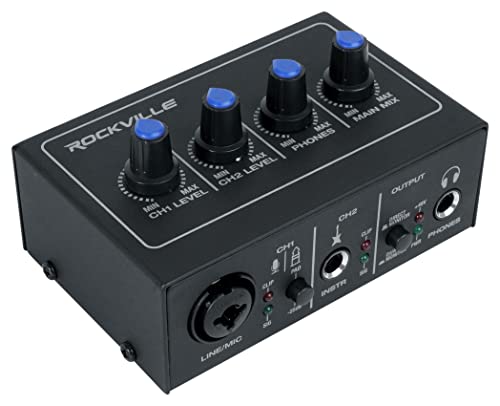
The Rockville ROCK-U MINI USB Audio Interface stands out as an excellent choice for musicians and podcasters seeking high-quality recording without latency issues. With premium 24-bit/192 kHz converters and low-noise preamps, you’ll enjoy clean audio and ample headroom. Its versatile connectivity options include an XLR/1/4 combo input with 48V phantom power and a dedicated Hi-Z instrument input. You’ll appreciate the direct zero-latency monitoring and visual signal indicators to prevent distortion. This compact, USB bus-powered interface is perfect for mobile setups. Plus, the independent gain controls and dedicated monitor knobs make it easy to tailor your sound while recording.
Best For: Musicians and podcasters seeking high-quality, portable recording solutions with zero latency.
Pros:
- Premium audio quality with 24-bit/192 kHz converters and low-noise preamps.
- Compact and portable design, making it ideal for mobile recording setups.
- Direct zero-latency monitoring ensures distraction-free recording.
Cons:
- Limited to two input channels, which may not suffice for larger setups.
- USB bus-powered, which could be a limitation in power-reliant scenarios.
- Lack of advanced features that may be present in more expensive interfaces.
Wrugste USB Audio Interface for Recording and Streaming

For musicians and content creators looking for a reliable solution to capture high-quality audio, the Wrugste USB Audio Interface stands out with its ultra-low latency and 24Bit/192kHz recording quality. It features +48V phantom power, ensuring your microphones perform efficiently. With combo inputs for XLR and ¼” jacks, you can easily connect instruments and vocals. The direct monitoring option lets you switch between MONO and STEREO for versatile playback. Plus, it’s driver-free for Mac and Windows installations, making setup a breeze. With a solid 4.3-star rating, this interface is a top choice for seamless recording and streaming.
Best For: Musicians and content creators seeking a high-quality, user-friendly audio interface for recording and streaming.
Pros:
- Ultra-low latency ensures real-time audio monitoring and playback.
- 24Bit/192kHz recording quality provides professional-grade sound clarity.
- Driver-free installation simplifies setup on Mac and Windows devices.
Cons:
- Limited compatibility with some 4-pole TRRS plugs, which may cause operational issues.
- While versatile, it may lack advanced features found in higher-end models.
- Customer support response times may vary based on technical issues.
Factors to Consider When Choosing a Low Latency Audio Interface
When you’re choosing a low latency audio interface, there are several key factors you should keep in mind. Consider the audio resolution, input options, and monitoring capabilities that fit your needs. Also, don’t overlook preamp quality and software compatibility, as these can greatly impact your recording experience.
Audio Resolution Importance
Understanding audio resolution is essential for anyone looking to choose the right low latency audio interface. Audio resolution, measured in bits and kilohertz (kHz), directly affects the clarity and detail of your recordings. Higher resolutions, like 24-bit/192kHz, capture subtle nuances and reduce noise, giving you a dynamic range that enhances sound quality. On the other hand, lower resolutions, such as 16-bit/44.1kHz, can compromise your recordings by limiting headroom and introducing unwanted artifacts. This can hinder your mixing and mastering processes in digital audio workstations (DAWs). If you aim for studio-quality recordings, especially in professional music production and streaming, selecting an audio interface with adequate audio resolution is vital for achieving the best results.
Input Options Variety
Choosing the right low latency audio interface means considering the variety of input options available. Look for combo XLR/line inputs and dedicated instrument inputs to connect different sound sources like microphones and guitars flexibly. If you plan on recording multiple instruments or vocal tracks simultaneously, opt for an interface with multiple inputs to enhance your project’s complexity. Some interfaces offer phantom power for condenser microphones, broadening your mic compatibility for varied recording needs. Additionally, high-headroom instrument inputs capture guitar and bass signals without distortion, preserving sound quality. Finally, independent gain controls for each input allow precise adjustments, optimizing sound levels and reducing noise during recording. These factors can greatly impact your recording experience.
Monitoring Capabilities Necessity
Having reliable monitoring capabilities is essential for any recording setup, as it allows you to hear your audio input in real-time without delay. Low latency monitoring guarantees you can perform and communicate effectively, keeping your recordings in perfect time and capturing the right dynamics. Look for audio interfaces that offer zero-latency monitoring options, which bypass any processing delays and deliver immediate playback through your headphones or speakers. The ability to switch between direct monitoring and playback of recorded tracks lets you balance your performance with pre-recorded audio, enhancing your production quality. Additionally, features like dedicated headphone outputs and independent gain controls provide flexibility in sound management, making your recording experience smoother across various environments.
Preamp Quality Considerations
When selecting a low latency audio interface, preamp quality is a crucial factor that can make or break your recordings. The preamp you choose greatly impacts sound capture, enhancing clarity and brightness. Opt for high-headroom preamps to prevent clipping and distortion, especially when recording dynamic sources like vocals and instruments. Transparent preamps are essential, as they preserve your microphone’s natural tone for accurate sound reproduction. Don’t forget about phantom power, typically +48V, which is necessary for powering condenser microphones effectively. A preamp’s dynamic range also matters; a higher dynamic range allows you to capture subtle nuances in audio, resulting in clearer and more detailed recordings. Prioritize these factors to elevate your recording quality.
Software Compatibility Range
The quality of your preamps is just one piece of the puzzle in achieving great recordings; software compatibility plays a significant role too. You’ll want a low latency audio interface that supports a wide range of Digital Audio Workstations (DAWs) like Pro Tools, Ableton Live, and Cubase. Make sure it includes drivers compatible with both Mac and Windows to maximize usability. Look for interfaces that support ASIO drivers, which are essential for low-latency performance during real-time monitoring. Additionally, consider interfaces that come with bundled software packages, offering extra effects and instruments. Compatibility with recording and streaming software, like OBS or Zoom, can also enhance versatility for live performances and podcasts, making your setup more efficient and effective.
Latency Performance Metrics
Choosing a low latency audio interface involves understanding several key performance metrics that can greatly impact your recording experience. Latency, measured in milliseconds (ms), is essential; lower values mean better performance for real-time audio monitoring. Aim for a latency of 10-15ms for most applications, but if you’re in a professional environment, aim for under 5ms.
Buffer size is another vital factor—smaller sizes reduce latency but demand more processing power. Also, consider sample rates; while higher rates can lower latency, they may increase CPU load, so balance is key. Finally, look for monitoring options like direct monitoring features, which help you hear your input signal directly, reducing perceived latency during recording.
Design and Portability
How important is design and portability in selecting a low latency audio interface? When you’re on the go, a compact and lightweight design is essential. Look for sturdy metal housing that keeps your interface durable without adding unnecessary weight. User-friendly features, like illuminated control knobs, make adjustments easier in low-light settings, enhancing your recording experience. USB bus-powered interfaces are a game-changer, eliminating bulky power supplies and simplifying transport. Additionally, ergonomic designs with dedicated volume knobs and accessible input controls help you stay focused during dynamic sessions. Prioritizing these elements guarantees that your audio interface not only performs well but also fits seamlessly into your mobile recording setup. Choose wisely, and you’ll enjoy a more efficient workflow wherever you are.
Connectivity Options Availability
When considering a low latency audio interface, connectivity options play a pivotal role in ensuring it meets your recording needs. Start by checking the number and type of inputs, like combo XLR/Line and dedicated instrument inputs, as these provide versatility for various setups. Look for balanced outputs and headphone outputs for compatibility with different monitoring systems. It’s also essential to assess features like phantom power for condenser mics, which expands your microphone options. Make sure the interface supports USB-C or USB 2.0 for faster data transfer and reduced latency. Finally, evaluate additional features like loopback functionality, which can enhance your streaming capabilities and simplify audio routing for live performances or podcasts.
