If your TV has eARC or ARC but your receiver does not, the right adapter can bridge the gap without replacing your whole system. These converters are designed to move audio from modern displays to older AV gear with less hassle.
Below, we focus on practical picks that balance compatibility, sound format support, and ease of use for everyday home theater setups.
Best 10 Hdmi Earc Adapter for Older Receiver Picks for 2026
eARC-to-Optical Pick
TV eARC/ARC to Optical Audio Extractor

- Converts TV eARC/ARC to optical
- Supports PCM 2.0, Dolby 5.1, DTS 5.1
- Includes cables and USB power
Best For: Older optical-only soundbars and headphone bases
AVR Bridge Choice
HDMI eARC to HDMI Audio Extractor

- Sends eARC audio to an HDMI receiver
- Supports 4K@60Hz, HDR, Dolby Vision
- Includes switchable TV and source modes
Best For: HDMI receiver and AVR setups
Legacy Audio Converter
eARC/ARC to Toslink and Coaxial
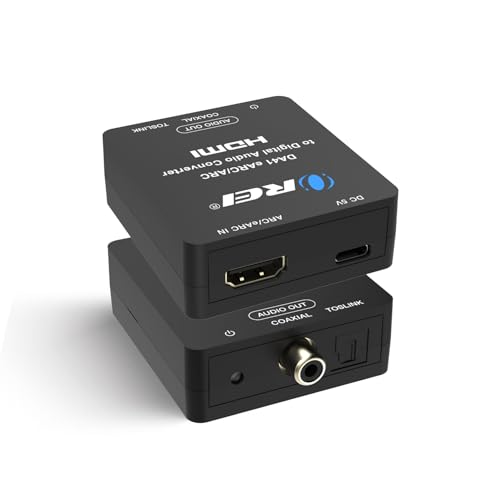
- Converts ARC/eARC to Toslink or coaxial
- Supports PCM 2.0, PCM 5.1, Dolby 5.1, DTS 5.1
- Plug-and-play with LED indicator
Best For: Older receivers with optical or coaxial inputs
Legacy Receiver Bridge
HDMI eARC/ARC to Optical Audio Adapter

- Converts TV eARC/ARC to optical or coaxial
- Supports PCM 2.0, Dolby Digital 5.1, DTS 5.1
- No CEC or TV-remote volume control
Best For: TVs with eARC/ARC feeding an older receiver via digital audio
Video-Pass-Through Extractor
4K HDMI Audio Extractor with Optical/3.5mm
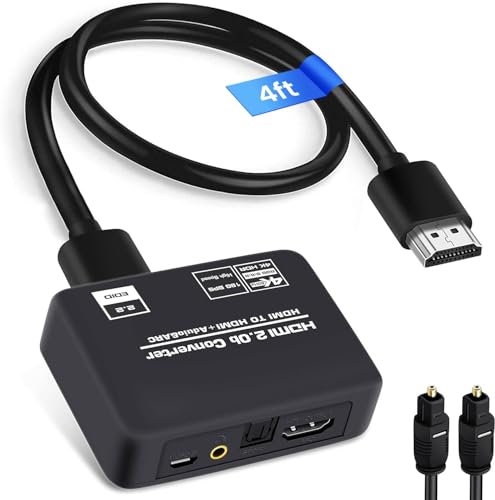
- Keeps 4K@60Hz video pass-through
- Outputs optical SPDIF or 3.5mm stereo
- Includes cables and USB power adapter
Best For: Systems needing 4K video plus audio out to an older receiver or speaker
Flexible Output Extractor
HDMI eARC to Optical + Coaxial Adapter

- ARC/eARC input to optical, coaxial, and 3.5mm outputs
- Supports PCM 2.0, Dolby 5.1, and DTS 5.1
- Plug-and-play with 24bit/192KHz support
Best For: Older receivers and home theater systems that need multiple audio output choices
Minimal Optical Adapter
HDMI eARC to Optical Audio Adapter

- Optical-only output keeps setup simple
- Supports PCM 2.0, Dolby 5.1, and DTS 5.1
- Includes HDMI, optical, and USB cables
Best For: Simple TV-to-receiver or TV-to-headphone optical connections
EARC-to-Optical Pick – TV eARC/ARC to Optical Audio Extractor
If you need an HDMI eARC adapter for older receiver or soundbar setups, this eSynic unit is built for one job: taking audio from a TV’s eARC/ARC port and sending it out through optical. It’s a practical match for older gear that only accepts Toslink input, and it keeps the setup simple with plug-and-play operation and USB power.
Best For: New TVs paired with older optical-only soundbars, headphone bases, or home theater gear.
Pros:
- Converts TV eARC/ARC audio to a single optical output
- Supports PCM 2.0, Dolby 5.1, and DTS 5.1 formats
- Includes optical cable, HDMI cable, and USB power cable
- No drivers or software required
Cons:
- Requires a TV port labeled eARC or ARC
- No CEC volume control over optical connections
- Setup depends on correct TV audio settings and USB power
This is a focused converter for people who want clean optical output without extra jacks or a receiver upgrade. If your older audio gear only has Toslink, this keeps the path straightforward.
AVR Bridge Choice – HDMI eARC to HDMI Audio Extractor
This HDMI eARC adapter for older receiver setups is designed for people who want to feed a regular HDMI audio receiver from a modern eARC TV. The U9 extractor keeps the video signal going to the TV while sending audio to the receiver, and it also supports HDMI source extraction when you need to route audio from a player into the AVR.
Best For: Home theater users with an HDMI receiver or AVR that needs eARC/ARC audio support.
Pros:
- Passes audio to an HDMI receiver through a dedicated AVR output
- Supports 4K@60Hz, HDR, Dolby Vision, and HDMI 2.0b bandwidth
- Works with eARC TVs when CEC and eARC are enabled
- Includes simple switch-based modes for TV audio or HDMI source audio
Cons:
- Needs a constant DC 5V USB power source
- Requires specific switch settings for each use case
- TV built-in speakers do not play when eARC mode is on
This is the most flexible option here for users connecting a modern TV to an HDMI receiver instead of optical gear. It’s best if you’re comfortable matching the switch settings to the signal path.
Dual-Output Value – HDMI eARC/ARC to Optical and Coaxial Converter
If you want an HDMI eARC adapter for older receiver equipment, this converter gives you both optical and coaxial digital outputs from a TV’s ARC/eARC port. That makes it a useful fit when you’re not sure whether your legacy amp, soundbar, or active speaker system prefers Toslink or coaxial input.
Best For: TVs being connected to older audio gear with either optical or coaxial inputs.
Pros:
- Converts eARC/ARC audio to optical or coaxial output
- Supports PCM 2.0, Dolby 5.1, and DTS 5.1
- Plug-and-play design with USB power from TV or adapter
- Indicator light shows PCM or DTS/Dolby input status
Cons:
- TV remote volume control only works with PCM input
- CEC must be enabled for ARC setup
- Requires correct TV audio format settings for best results
This is a practical middle-ground converter if your older receiver supports digital audio but not HDMI. The dual outputs make it easier to match whatever input your gear already has.
Legacy Audio Converter – eARC/ARC to Toslink and Coaxial
For shoppers looking for an HDMI eARC adapter for older receiver hardware, the OREI DA41 is a straightforward way to convert TV ARC/eARC audio into Toslink or coaxial output. It’s made for simple hookup to a digital audio device, with plug-and-play setup and a focus on standard PCM and 5.1 formats.
Best For: Older receivers, sound systems, and headphone setups with optical or coaxial digital inputs.
Pros:
- Converts HDMI ARC/eARC audio to Toslink or coaxial
- Supports PCM 2.0, PCM 5.1, Dolby 5.1, and DTS 5.1
- Includes power cable, on/off switch, and LED indicator
- Works as a simple plug-and-play extractor
Cons:
- TV remote volume control is not supported over optical/coaxial
- Requires HDMI 2.1 cable for eARC support
- Not compatible with Dolby AC3 or Dolby Digital Plus
This model is best for basic digital audio conversion without extra features. If your older receiver still has optical or coaxial inputs, it gives you a clean upgrade path from a modern TV.
Legacy Receiver Bridge – HDMI eARC/ARC to Optical Audio Adapter
If you need an HDMI eARC adapter for older receiver setups, this converter is built to take a TV’s HDMI eARC/ARC audio and send it out through optical or coaxial. It’s a practical way to keep using an older AV receiver, soundbar, or external speakers while getting support for PCM 2.0, Dolby Digital 5.1, and DTS 5.1.
Best For: TVs with eARC/ARC that need to feed an older receiver via optical or coaxial audio.
Pros:
- Converts HDMI eARC/ARC to optical or coaxial output for older audio gear
- Supports PCM 2.0, Dolby Digital 5.1, and DTS 5.1
- Includes Toslink cable and USB power cable
- Aluminum case helps with durability and heat dissipation
Cons:
- Not compatible with Apple TV
- Does not support CEC or volume control over optical/coaxial
- Requires a real TV with an eARC/ARC port and HDMI 2.1 cable for eARC support
This is a straightforward pick if your goal is to bridge modern TV audio to legacy receiver inputs. Just be sure your TV and setup match the compatibility notes before buying.
Video-Pass-Through Extractor – 4K HDMI Audio Extractor with Optical/3.5mm
For shoppers looking for an HDMI eARC adapter for older receiver systems, this extractor adds flexibility by converting HDMI audio to optical SPDIF or 3.5mm stereo while keeping 4K@60Hz video pass-through. It’s a useful fit when you want to send TV or source audio to an amplifier, soundbar, or speaker without changing the rest of your setup.
Best For: Mixed home theater setups that need HDMI video pass-through plus optical or stereo audio output.
Pros:
- Supports 4K@60Hz, HDR10, and HDCP 2.2
- Offers optical SPDIF and 3.5mm audio outputs
- Includes HDMI cable, optical cable, and USB power adapter
- Provides TV, 2.0CH, and 5.1CH audio mode options
Cons:
- ARC function is limited to HDTV input and ARC/eARC interfaces
- 3.5mm output is stereo only
- Requires external power
This model makes sense if you need both video continuity and a simple audio extraction path to older equipment. It’s especially handy for systems that still rely on optical or analog inputs.
Compact Optical Converter – LiNKFOR eARC to Optical Converter
If you want an HDMI eARC adapter for older receiver or headphone setups, this compact converter keeps things simple by turning your TV’s eARC/ARC signal into optical audio. It’s designed for plug-and-play use and supports 24bit/192kHz audio with PCM 2.0, Dolby 5.1, and DTS 5.1.
Best For: Small, low-fuss TV audio setups that need optical output for soundbars, receivers, or wireless headphones.
Pros:
- Converts TV eARC/ARC to optical audio output
- Supports 192kHz / 24bit and Dolby 5.1 / DTS 5.1
- Plug-and-play design with no software or drivers
- Includes a 2.1m cable and audio signal indicator
Cons:
- Does not support CEC volume control
- Requires the TV’s HDMI port to have an eARC/ARC logo
- Optical output means no HDMI audio return to the receiver
This is a practical choice if you mainly need stable TV-to-audio-device conversion without extra setup complexity. Its compact design and included cable make it easy to drop into an existing living-room system.
Flexible Output Extractor – HDMI eARC to Optical + Coaxial Adapter
If you need an HDMI eARC adapter for older receiver setups, this extractor is a straightforward way to move TV audio from an ARC/eARC port into optical, coaxial, or 3.5mm inputs. It’s a practical pick when your receiver, soundbar, or home theater gear lacks HDMI audio inputs but can still handle digital or analog audio from the TV.
Best For: TVs with ARC/eARC that need flexible output options for older receivers, soundbars, or home theater systems.
Pros:
- Converts TV ARC/eARC output to optical, coaxial, or 3.5mm audio.
- Supports PCM 2.0, Dolby 5.1, and DTS 5.1 formats.
- Handles up to 24bit/192KHz audio sampling rate.
- Plug-and-play setup with no drivers needed.
Cons:
- Requires a TV with a working eARC/ARC port.
- Does not support CEC remote volume control.
- Not for standard HDMI input use.
Overall, this is a versatile bridge for older audio gear if you want multiple output types in one compact adapter. The added coaxial and 3.5mm options make it more flexible than optical-only models.
Cable-Style ARC Converter – HDMI ARC to Optical Audio Cable
This HDMI earc adapter for older receiver setups is designed for TVs that only offer ARC/eARC audio and need an optical connection to a soundbar, amplifier, or powered speaker. The 6-foot cable-style converter keeps the installation simple while converting the TV’s ARC audio channel into digital optical output.
Best For: TV owners who want a cable-style ARC-to-optical solution for soundbars, amplifiers, or active speakers.
Pros:
- Converts TV ARC/eARC audio to optical output.
- Supports PCM 2.0, Dolby 5.1, and DTS 5.1.
- Works up to 24bit/192KHz sampling rate.
- Includes a 6 ft cable format for easy routing.
Cons:
- Needs TV CEC and ARC/eARC settings enabled.
- Optical output does not support CEC volume control.
- Requires TV USB power or an adapter.
This model is a clean, no-fuss option if you want a direct optical link from a modern TV to legacy audio gear. Its cable form factor may appeal to buyers who prefer fewer separate components.
Minimal Optical Adapter – HDMI eARC to Optical Audio Adapter
If you want an HDMI eARC adapter for older receiver systems without adding extra outputs, this optical-only converter keeps things simple. It extracts audio from a TV’s ARC/eARC port and sends it to an optical input on a receiver, home theater, or wireless headphone setup.
Best For: Buyers who want a simple optical-only link from an ARC/eARC TV to legacy audio gear.
Pros:
- Converts HDMI ARC/eARC audio to optical output only.
- Supports up to 24bit/192KHz audio.
- Works with PCM 2.0, Dolby 5.1, and DTS 5.1.
- Includes HDMI, optical, and USB power cables.
Cons:
- Will not work from a standard HDMI port.
- Does not support HDMI-only soundbars.
- CEC volume control is not available through optical.
This is a sensible choice if your main goal is reliable TV-to-optical audio with minimal clutter. The included indicators may also help confirm whether you’re getting 2.0 or 5.1 output.
How We Picked the Best Hdmi Earc Adapter for Older Receiver
We prioritized adapters that are relevant for an Hdmi Earc Adapter for Older Receiver setup: broad TV compatibility, reliable ARC/eARC handshake handling, and support for common formats such as PCM 2.0, Dolby Digital 5.1, and DTS 5.1. We also favored units with clear output options, simple plug-and-play operation, and power requirements that are easy to manage in a real living room setup.
Quick Comparison: What Matters Most
If you just need basic TV audio into an older receiver, an optical-only model may be enough. If you want more flexibility, look for converters with coaxial and analog 3.5mm outputs as well. Some units focus on clean digital audio only, while others add volume control, signal indicators, or HDMI pass-through features for more complex systems.
Key Buying Factors for an Hdmi Earc Adapter for Older Receiver
Audio Format Support
Check whether the adapter supports the formats your TV actually outputs. Many older receivers work best with PCM 2.0, Dolby Digital 5.1, or DTS 5.1. If your source is sending Dolby Atmos or other advanced formats, the adapter should downmix or pass audio in a way your receiver can decode.
Output Type
Optical is the most common choice, but coaxial can be useful if your receiver supports it. Analog 3.5mm outputs help for secondary zones, headphones, or powered speakers. The best option depends on the inputs already available on your receiver.
CEC and Control Behavior
Some adapters preserve CEC-related functions or include volume control, while others intentionally disable CEC to avoid handshake problems. If you want a simple system, fewer control features can actually mean fewer compatibility issues.
Power and Cable Length
USB power is standard, so make sure you have a stable port or adapter nearby. Cable length also matters, especially if your TV and receiver are mounted in different locations. A short, well-built cable can reduce clutter, but only if it reaches comfortably.
Who Should Buy Which Hdmi Earc Adapter for Older Receiver?
If you mainly want the simplest fix for a basic living-room setup, choose a straightforward optical converter. If your receiver has multiple digital inputs and you want more flexibility, pick a model with optical and coaxial outputs. If you are troubleshooting a picky TV or a more complex HDMI chain, a feature-rich adapter with indicators, ARC/eARC handling notes, and better control options is usually worth the extra cost.
For most buyers, the best Hdmi Earc Adapter for Older Receiver is the one that matches your receiver’s inputs first, then your TV’s audio settings second. Start with the connection you will actually use every day, and keep the setup as simple as possible.
