Professional studios need dependable video transport, low-latency switching, and flexible streaming outputs—not just a basic capture card. The right hardware encoder can reduce computer workload while supporting production workflows built around HDMI, SDI, NDI, RTMP, SRT, or other delivery protocols.
This roundup compares 10 options spanning dedicated encoders, live production switchers, capture hardware, and an audio streaming device. Use the guide below to match each design with your studio’s cameras, resolution targets, control requirements, and distribution platforms.
Best 10 Hardware Streaming Encoders for Professional Studios Picks for 2026
Best All-in-One Encoder/Decoder

- 4K30 H.264/H.265 hardware encoding
- RTMP, SRT, HLS, RTSP, and multicast support
- Decoder, multi-view, OSD, and recording functions
Best For: Integrated streaming, IPTV, and studio AV workflows
Best Compact Capture Option
Blackmagic UltraStudio Mini Recorder

- Thunderbolt-connected video capture hardware
- 1080p capture resolution
- Works with Windows and Linux systems
Best For: Computer-based studio capture and editing setups
Best for Multicamera Production

- Four HDMI inputs with 4K60 support on two inputs
- Dual-platform IP and USB-C UVC streaming
- PTZ joystick control and SD/USB recording
Best For: Multicamera live production and studio switching
Best Audio-Only Encoder
AES XLR Network Audio Streamer
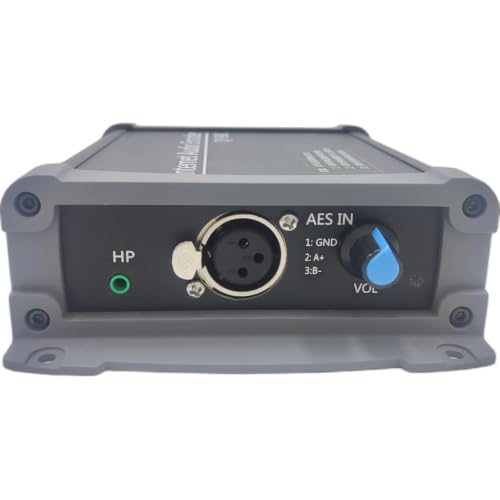
- 24-bit/48kHz balanced AES/EBU XLR I/O
- SRT, RTMP, RTP/TS, RTSP, and Icecast support
- Fanless design with fail-restart and 24/7 operation
Best For: Low-latency professional IP audio transport
Best All-in-One Production Hub

- Eight SDI/HDMI inputs with four-source selection
- NDI, SRT, RTMP, dual streaming, and recording
- PTZ control, Super Source, chroma key, and audio mixing
Best For: Multi-camera studio and live-event productions
Best Ultra-Portable Encoder

- Pocket-sized 1080p60 HDMI hardware encoder
- HEVC/H.265 and H.264 support
- SRT, RTMP, RTSP, UDP, and HLS workflows
Best For: Mobile, outdoor, and remote broadcasts
Best PC-Free Switching Option
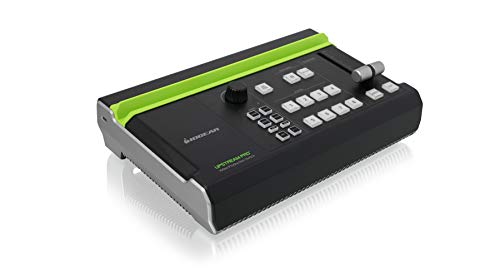
- Three HDMI inputs with one 4K input
- PC-free H.264 recording and direct streaming
- Integrated microphone and RCA audio inputs
Best For: Small HDMI-based productions and mobile studios
Feature-Rich Studio Switcher
Neolive R5PRO 4K Multi-Camera Switcher

- Two 4K and two 1080p HDMI inputs
- Hardware RTMP streaming with recording
- PTZ control, chroma key, and audio mixing
Best For: Multi-camera studios needing an integrated production workflow
Best Heavy-Duty Pick
Mirabox 1080p60 HDMI Capture Card

- 1080p60 capture and passthrough
- 4K@30Hz input support
- Plug-and-play USB 3.0 UVC connection
Best For: Computer-based streaming from one HDMI source
Dual-Stream Production Hub

- Four HDMI inputs with two 4K60 ports
- Dual RTMP streaming without a computer
- PTZ, audio, graphics, recording, and UVC output
Best For: Professional multi-camera teams streaming to multiple platforms
Best All-in-One Encoder/Decoder – 4K HDMI Streaming Encoder
For studios seeking hardware streaming encoders for professional studios, this 4K HDMI unit combines real-time H.264/H.265 encoding with network decoding. It supports 4K at 30fps, multiple streaming protocols, dual concurrent outputs, local recording, and web-based configuration without relying on a host computer.
Best For: Churches, classrooms, IPTV systems, digital signage, control rooms, and live-event teams that need encoding and decoding in one compact device.
Pros:
- Accepts HDMI video up to 4K at 30fps and supports H.264 and H.265.
- Supports RTMP, RTSP, SRT, HLS, FLV, TS, RTC, and UDP Multicast workflows.
- Provides HDMI loopout, multi-view layouts, OSD overlays, and USB or network recording.
- Designed for 24/7 operation in a compact all-metal chassis.
Cons:
- Maximum stated input and output frame rate is 30fps at 4K.
- Brand and software-update details are limited in the supplied specifications.
This is a flexible choice when a professional studio needs more than a basic stream encoder. Its decoder, overlay, recording, and multicast features broaden its usefulness for integrated AV installations, though buyers should confirm platform compatibility and workflow requirements before deployment.
Best Compact Capture Option – Blackmagic UltraStudio Mini Recorder
Blackmagic Design Ultrastudio MINI Recorder Video Editing Card, Hardware Encoder
Check Price On AmazonThe Blackmagic UltraStudio Mini Recorder is a compact Thunderbolt-connected hardware encoder and video capture card for workflows that already include a compatible computer. With 1080p capture and support for Windows and Linux, it offers a straightforward way to bring video into a studio editing or streaming setup.
Best For: Laptop and desktop-based production systems with a Thunderbolt port, compatible operating system, and suitable CPU and memory.
Pros:
- Compact and lightweight design at approximately 8.48 ounces.
- Supports 1080p video capture through a Thunderbolt interface.
- Compatible with Windows and Linux systems meeting the listed requirements.
- Includes Blackmagic Media Express for the stated workflow.
Cons:
- Requires a computer with Thunderbolt, a decent CPU, and at least 4GB of RAM.
- Its listed capture resolution is limited to 1080p rather than 4K.
- It is less self-contained than network encoders with built-in streaming controls.
This model suits studios that prefer computer-based production and need a small capture interface rather than a standalone network appliance. Confirm the host computer’s Thunderbolt compatibility and operating-system requirements before buying.
Best for Multicamera Production – NeoLIVE N5 Streaming Switcher
The SPROLINK NeoLIVE N5 is a production-focused switcher for teams comparing hardware streaming encoders for professional studios alongside multicamera control. It combines 4K-capable inputs, H.264 encoding, switching, PTZ control, recording, monitoring, and IP streaming in an all-in-one system with a 10.1-inch flip screen.
Best For: Live studios, houses of worship, conferences, sports, education, podcasts, and other productions using multiple HDMI, SDI, or PTZ sources.
Pros:
- Offers four HDMI inputs, including two supporting 4K at 60fps, plus USB input.
- Supports SRT, RTMP, RTSP, NDI, and USB-C UVC streaming, including up to two platforms simultaneously.
- Provides HDMI and SDI program outputs, an HDMI AUX output, and multi-view options.
- Includes PTZ joystick control, camera presets, and SD card or USB recording.
Cons:
- Stated recording and streaming output is up to 1080p at 60fps despite 4K-capable inputs.
- Its broad feature set may require more setup and operator training than a basic encoder.
- The supplied notes do not provide complete audio-mixing specifications.
For live productions that need switching and encoding in the same control surface, the NeoLIVE N5 is more capable than a simple HDMI streamer. It is especially attractive where PTZ cameras, instant playback, and multiple output types are part of the production plan.
Best Audio-Only Encoder – AES XLR Network Audio Streamer
Studios that need dependable audio transport rather than video encoding may prefer this AES/EBU XLR hardware streamer. It supports 24-bit/48kHz digital audio, SRT low-latency transmission, and several IP audio protocols in a fanless design intended for continuous operation.
Best For: Broadcast, REMI, point-to-point, and one-to-many audio distribution using balanced AES/EBU XLR connections.
Pros:
- Provides balanced digital AES/EBU XLR input and output at 24-bit/48kHz.
- Supports SRT, RTMP, RTP/TS, RTSP, and Icecast protocols.
- Fanless hardware encoding, fail-restart functionality, and 7×24 operation support continuous workflows.
- Offers web GUI and front-panel control in a compact encoder/decoder pair.
Cons:
- This is an audio encoder, not a full video streaming encoder.
- Its maximum stated sample rate is 48kHz.
- Buyers must have compatible AES/EBU XLR equipment or a suitable mixer workflow.
This unit fills a specialized role in professional studios by handling network audio with low-latency SRT and broadcast-oriented connectivity. It is a strong complement to video hardware, but it should not be selected when HDMI or SDI video encoding is the primary requirement.
Best All-in-One Production Hub – SPROLINK NeoLIVE R5S PRO
For studios needing hardware streaming encoders for professional studios alongside switching and recording, the SPROLINK NeoLIVE R5S PRO combines multi-camera input management with built-in streaming tools. It accepts four active sources from four SDI and four HDMI inputs, including two HDMI inputs supporting 4K at 60 fps.
Best For: Church services, esports, live events, podcasts, and studio productions requiring switching, PTZ control, recording, and streaming in one device.
Pros:
- Supports eight total inputs with any four selectable, including SDI and HDMI sources.
- Built-in NDI, SRT, and RTMP support enables dual-platform streaming.
- Includes PTZ joystick control, Super Source layouts, chroma key, audio mixing, and USB/SD recording.
- Offers SDI, HDMI, multiview, and USB 3.0 UVC outputs for flexible monitoring and capture.
Cons:
- Program output and recording are specified at up to 1080p60 despite support for selected 4K inputs.
- Its broad feature set may be more than needed for simple single-camera streaming.
The R5S PRO is the most comprehensive option here for a fixed production environment. Choose it when your workflow benefits from integrated switching, PTZ control, graphics-style compositing, recording, and network streaming rather than a standalone encoder.
Best Ultra-Portable Encoder – DDMALL HEV-2KW
The DDMALL HEV-2KW is a compact choice for hardware streaming encoders for professional studios that also need a mobile or remote contribution unit. This HDMI encoder accepts up to 1080p60 video and provides H.265/HEVC or H.264 hardware encoding in a pocket-sized body.
Best For: Outdoor broadcasts, church services, weddings, sports, drone feeds, remote education, and space-constrained streaming setups.
Pros:
- Very small 75 × 32 × 15 mm design and approximately 25 g weight support portable use.
- Supports HEVC/H.265 and H.264 encoding at up to 1080p60.
- Offers SRT, RTMP/RTMPS, RTSP, UDP, and HLS compatibility with multi-platform output.
- Includes one-click live control, cloud management, Web-UI preview, OSD settings, and NTP synchronization.
Cons:
- It is limited to HDMI input and 1080p output, so it is not intended for 4K production chains.
- Its USB-powered, wireless-oriented design depends on an available network connection for streaming.
This is the most practical pick when portability matters more than switching or local production features. It works especially well as a compact encoder at the camera or as a remote feed device that can connect through a mobile hotspot.
Best PC-Free Switching Option – IOGEAR Upstream Pro
The IOGEAR Upstream Pro suits buyers comparing hardware streaming encoders for professional studios who want a portable production switch without relying on a computer. It combines three HDMI inputs with capture, monitoring, recording, streaming, and basic audio mixing in one device.
Best For: Small productions, mobile studios, presentations, interviews, and creators who need straightforward HDMI switching with direct streaming.
Pros:
- Provides three HDMI inputs, including one 4K input and two 1080p inputs.
- Supports direct H.264 recording to USB storage without a PC.
- Includes a 1/4-inch microphone input and RCA left/right audio input for mixing.
- Can stream directly to YouTube, Facebook, Twitch, and other services.
Cons:
- The listed 1080p operating capability and 30 fps specification make it less suited to high-frame-rate production.
- It offers fewer inputs and less advanced network-production functionality than the SPROLINK unit.
The Upstream Pro is a sensible middle ground for HDMI-focused workflows. It is easier to deploy than a computer-based setup and adds direct recording and streaming, but larger studios may prefer a device with more inputs or dedicated SDI and network-encoder features.
Feature-Rich Studio Switcher – Neolive R5PRO 4K Multi-Camera Switcher
For studios seeking hardware streaming encoders for professional studios, the SPROLINK Neolive R5PRO combines multi-camera switching, hardware RTMP streaming, recording, audio mixing, and PTZ control in one production unit. It accepts two 4K HDMI sources, two 1080p HDMI sources, and a USB-A media or camera input, with any four sources selectable for active production.
Best For: Multi-camera studios, podcasts, presentations, and productions that need integrated switching, recording, direct streaming, and PTZ control.
Pros:
- Supports two 4K 50/60fps HDMI inputs plus two 1080p HDMI inputs.
- Built-in hardware RTMP streaming and simultaneous recording to USB storage.
- Includes PTZ joystick control, chroma key, lower thirds, transitions, and audio delay adjustment.
- Offers HDMI monitoring outputs and USB-C 1080p UVC output for computer workflows.
Cons:
- NDI input requires a separately sold license.
- Only four of the five available sources can be active at once.
- Its broad feature set may be more than a simple single-camera setup requires.
The R5PRO is a strong all-in-one choice when a studio wants to reduce dependence on separate switchers, encoders, recorders, and PTZ controllers. Its 4K input support and production-focused tools make it especially suitable for more involved live workflows.
Best Heavy-Duty Pick – Mirabox 1080p60 HDMI Capture Card
The Mirabox HSV321 is a straightforward addition to hardware streaming encoders for professional studios when the workflow starts with a single HDMI source and a computer. It captures up to 1080p at 60fps, supports 4K at 30Hz input and passthrough, and connects to streaming software through USB 3.0 UVC.
Best For: Studios, classrooms, conference rooms, and creators who need an affordable HDMI-to-computer capture path for OBS or similar software.
Pros:
- Captures and passes through video at up to 1080p60.
- Accepts 4K@30Hz input while providing HD capture and passthrough.
- Plug-and-play UVC operation supports Windows, Mac OS, and Linux/Unix workflows.
- Zero-latency HDMI passthrough is useful for monitoring or interactive applications.
Cons:
- It is a capture card rather than a standalone hardware streaming encoder.
- Capture resolution is limited to 1080p, despite 4K input support.
- It does not provide built-in switching, recording, PTZ control, or direct platform streaming.
The HSV321 makes sense when a computer handles encoding and production duties. It is compact and easy to deploy, but professional studios needing multi-source switching or PC-free streaming will need a more integrated unit.
Dual-Stream Production Hub – Neolive R5 4K Video Switcher
The SPROLINK Neolive R5 is designed for hardware streaming encoders for professional studios that need multi-camera production without relying entirely on a computer. Its four HDMI inputs, built-in RTMP encoder, NDI and SRT support, dual-platform streaming, and USB-C UVC output cover both standalone and software-assisted workflows.
Best For: Broadcast-style studios, podcasts, worship services, conferences, and teams producing multi-camera streams for multiple platforms.
Pros:
- Provides four HDMI inputs, including two supporting 4K60.
- Can stream to two platforms simultaneously through its built-in RTMP encoder.
- Includes dedicated program and multiview HDMI outputs plus 1080p60 USB-C UVC output.
- Adds PTZ control, audio mixing, chroma key, graphics, transitions, recording, and media playback.
Cons:
- Its HDMI capture and UVC output are limited to 1080p60.
- The feature-rich design may require more setup than a basic HDMI switcher.
- Direct streaming depends on an Ethernet connection and configured platform stream keys.
The Neolive R5 is the most complete fit here for teams building a dedicated live-production workflow. It balances standalone streaming with computer-based output, while its dual RTMP capability and production controls support more demanding studio operations.
How We Picked the Best Hardware Streaming Encoders for Professional Studios
We evaluated these products by looking at the role they serve in a professional workflow rather than treating every device as interchangeable. Key considerations included input and output formats, supported resolutions and frame rates, encoding standards, streaming protocols, switching capabilities, monitoring, audio connectivity, and whether the unit can operate without a full production computer.
The selection includes compact HDMI encoders, multi-camera switchers, capture devices, and a dedicated XLR audio streamer. Because feature sets vary substantially, confirm the exact specifications, included accessories, firmware support, and platform compatibility before buying.
Quick Comparison
| Best For | Look For | Products In This Roundup |
|---|---|---|
| Dedicated video encoding | H.264/H.265, RTMP, SRT, RTSP, HDMI loop-through | 4K@30 HDMI Encoder; DDMALL Wireless HDMI Encoder |
| Multi-camera production | Multiple HDMI or SDI inputs, transitions, overlays, multiview, streaming output | SPROLINK NeoLIVE and Neolive switchers; IOGEAR Upstream Pro |
| Computer-based capture | USB connectivity, passthrough, compatible capture software | Blackmagic UltraStudio Mini Recorder; Mirabox Capture Card |
| Audio-only streaming | XLR input, network protocols, stable continuous operation | AES Audio Encoder |
Key Buying Factors for Hardware Streaming Encoders for Professional Studios
Inputs, Outputs, and Signal Standards
Start with the cameras and sources you already own. HDMI is common for compact cameras and consumer gear, while SDI is often preferable for longer cable runs and installed studio systems. Check whether the encoder offers loop-through, simultaneous outputs, USB capture, or NDI support if you need to feed a switcher, recorder, confidence monitor, or network production system.
Resolution, Frame Rate, and Compression
4K support does not automatically mean 4K streaming. Verify the maximum input, encoded output, frame rate, chroma format, and whether 4K is available on every input. H.265 can reduce bandwidth, but H.264 remains broadly compatible with platforms and decoding hardware.
Protocols, Networking, and Reliability
RTMP is widely supported, while SRT can be useful for more resilient contribution over unpredictable networks. RTSP, HLS, UDP multicast, and NDI may matter for IPTV, internal distribution, or studio routing. Wired Ethernet, redundant power options, status indicators, and stable firmware are valuable for long events and unattended operation.
Switching, Control, and Audio
If you produce live shows, prioritize physical controls, multiview monitoring, transitions, PTZ control, keying, and audio mixing. A dedicated encoder is simpler when your video is already mixed; a switcher is more flexible when you need to combine several cameras and sources in real time.
Who Should Buy Which Hardware Streaming Encoders for Professional Studios?
Choose a dedicated HDMI encoder when you need a straightforward camera-to-stream appliance or a compact contribution unit. Select a multi-input SPROLINK or IOGEAR switcher for small studios, events, classrooms, houses of worship, and productions that require live camera switching. The Blackmagic or Mirabox devices are better suited to computer-based workflows where streaming software handles scenes, graphics, and recording. For radio, podcast, venue, or broadcast audio distribution, the AES XLR encoder is the most focused option.
Before ordering, confirm connector types, required output resolution, network throughput, platform protocol support, and whether your cameras provide clean HDMI or SDI. Those checks will prevent the most common compatibility problems.
