Choosing the right hardware streaming encoder can make live production more reliable, reduce computer workload, and simplify the path from camera to platform. The best option depends on your video inputs, target resolution, streaming protocols, and whether you also need switching or audio control.
We compared six creator-focused options spanning HDMI, SDI, IP streaming, portable production, and USB audio workflows. Use the guide below to narrow the field by setup, connectivity, and day-to-day production needs.
Best 6 Hardware Streaming Encoders for Content Creators Picks for 2026
Audio Command Center

- Dynamic USB microphone for voice-focused capture
- Push-button controls for volume and muting
- Routing and paging for multiple audio sources
Best For: Windows streamers and podcasters building an integrated audio setup
Network Broadcast Workhorse

- 4K60 HDMI input with lossless loop-out
- 1080p60 H.264/H.265 hardware encoding
- PoE and broad RTMP, SRT, RTSP, and WebRTC support
Best For: HDMI-based broadcasts and clean network installations
Hands-On Audio Control

- 5-inch color display for source identification
- Paging and encoders manage multiple audio sources
- Submix and routing controls for creator and audience audio
Best For: PC and Mac streamers needing tactile audio mixing
Professional SDI Flexibility
ZowieBox 3G SDI Encoder Decoder
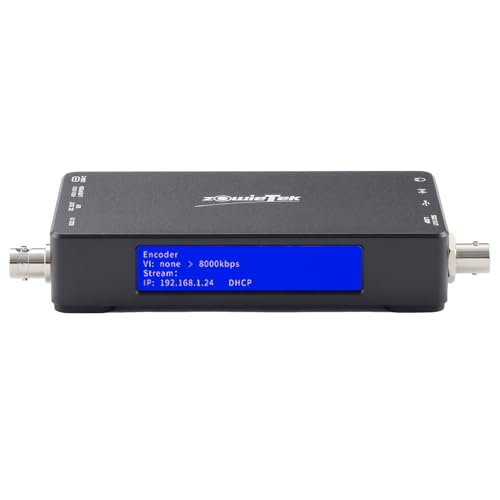
- SDI encoding and decoding for SRT, RTMP(S), and RTSP
- UVC conversion plus H.265/H.264 standalone operation
- PoE, USB-C, and DC power options
Best For: SDI-based creators and event production workflows
Portable Production Hub
IOGEAR Upstream Pro Video Switch
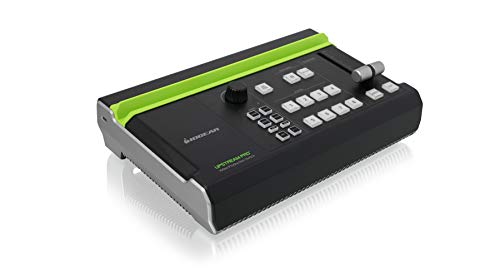
- Three HDMI inputs, including one 4K input
- Records H.264 directly to USB storage
- Streams without a PC and includes audio inputs
Best For: Mobile HDMI production and multi-source live streaming
Compact SRT Streaming
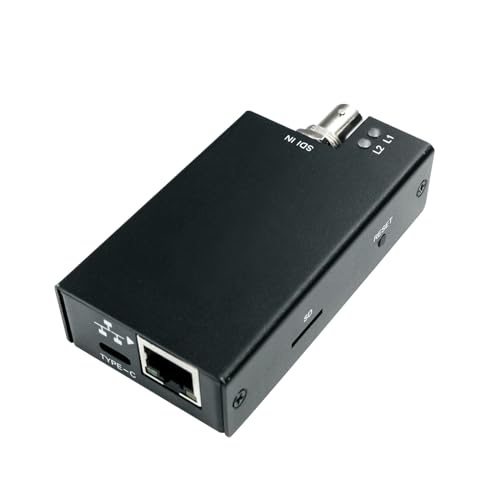
- 3G-SDI encoding up to 1080p60
- USB-C powered at 2.5W for mobile setups
- SRT, RTMP/RTMPS, RTSP, and UDP support
Best For: Portable SDI-to-IP streaming and remote production
Audio Command Center – BEACN Light Mix Bundle
For content creators comparing hardware streaming encoders for content creators, the BEACN Light Mix Bundle takes a different but useful approach: it combines a broadcast-style USB microphone with a Windows audio mixer for hands-on control of your setup. Its push-button encoders, software customization, and routing tools are designed to keep voice and computer audio manageable while you stream, podcast, or game.
Best For: Windows-based streamers, podcasters, and gamers who want a microphone and centralized audio control in one bundle.
Pros:
- Dynamic microphone is designed to reduce ambient-noise pickup compared with a condenser microphone.
- Push-button encoders provide precise volume adjustment and quick muting.
- Routing controls can direct audio to headphones, chat applications, or a streaming device.
- Knob paging supports control of more than four audio sources.
Cons:
- Its hardware and software focus is centered on Windows PCs.
- This is an audio-control bundle, not a video encoder for HDMI streaming.
The BEACN Light Mix Bundle is a practical choice when clean voice capture and fast audio management matter more than video conversion. It is especially appealing for creators who want fewer separate audio components on the desk.
Network Broadcast Workhorse – 1080p60 PoE HDMI Encoder
Among hardware streaming encoders for content creators, this UNISHEEN model is the most directly focused on video distribution. It accepts a 4K60 HDMI signal, provides lossless loop-out, and simultaneously produces a 1080p60 network stream using H.264 or H.265. PoE power, browser setup, and broad protocol support make it suitable for tidy installations as well as live broadcasts.
Best For: Creators, production teams, and event setups that need HDMI-to-network streaming with PoE, loop-through monitoring, and flexible protocol support.
Pros:
- Accepts 4K60 HDMI input while encoding a 1080p60 stream.
- Lossless HDMI loop-out supports real-time monitoring or connection to additional video equipment.
- PoE combines power and data over one Ethernet cable for cleaner installations.
- Supports RTMP, SRT, RTSP, HLS, WebRTC, and other network protocols.
Cons:
- Stream output is limited to 1920×1080, despite the 4K60 input and loop-out capability.
- Requires network configuration and is more specialized than a plug-and-play USB capture device.
- The supplied notes list both a three-year warranty claim and a one-year manufacturer warranty, so coverage should be verified before purchase.
This encoder is the strongest match here for creators who need a dedicated HDMI streaming appliance rather than an audio mixer. Its combination of 4K pass-through, 1080p60 encoding, PoE, and multiple protocols gives it useful flexibility for studio, venue, and LAN workflows.
Hands-On Audio Control – BEACN Mix Create
For creators evaluating hardware streaming encoders for content creators, the BEACN Mix Create is an audio-focused companion rather than a video encoder. This USB-C mixer for PC and Mac uses a color display, push-button encoders, submix controls, and flexible routing to give streamers quick access to application, microphone, headset, and stream audio levels.
Best For: PC and Mac streamers who want visible, tactile control over multiple audio sources and separate personal and audience mixes.
Pros:
- 5-inch full-color display helps identify controlled applications or hardware.
- Knob paging allows management of more than four sources.
- Submix controls help set different audio levels for the creator and the audience.
- Routing table can send audio to headphones, chat applications, or a streaming device.
Cons:
- It manages audio rather than encoding HDMI video for live streaming.
- Its USB-connected workflow depends on the companion BEACN software and computer setup.
- The supplied details do not specify current software-update support.
The Mix Create is a strong desk-side control surface for creators who already have video capture or encoding handled elsewhere. Its display, submix button, and tactile controls are particularly useful when balancing game, chat, microphone, and stream audio in real time.
Professional SDI Flexibility – ZowieBox 3G SDI Encoder Decoder
For content creators comparing hardware streaming encoders for content creators, the ZowieBox is a versatile choice when SDI equipment needs to connect with modern IP and computer-based workflows. It supports SDI encoding to SRT, RTMP(S), and RTSP, decoding back to SDI, and UVC conversion for compatible streaming applications.
Best For: Creators, event teams, and production workflows built around SDI cameras, switchers, monitors, or recorders.
Pros:
- Supports SDI, SRT, RTMP(S), RTSP, and UVC conversion in both directions.
- Offers H.265/H.264 encoding, SDI loopout, and standalone operation without a PC.
- PoE, USB-C, and DC power options provide flexible installation choices.
Cons:
- Its SDI-focused design may be excessive for HDMI-only or basic webcam setups.
- The supplied package lists a U.S.-only power supply.
The ZowieBox stands out when interoperability matters more than simplicity. Its combination of SDI loopout, UVC support, and network protocols makes it useful for both professional broadcast systems and PC-based streaming.
Portable Production Hub – IOGEAR Upstream Pro Video Switch
The IOGEAR Upstream Pro combines switching, capture, recording, audio mixing, and streaming in one device, making it a practical option among hardware streaming encoders for content creators. It accepts three HDMI sources, records directly to USB storage, and streams without requiring a PC.
Best For: Mobile producers and creators who need to switch multiple HDMI cameras or devices while managing audio and streaming from a single unit.
Pros:
- Provides two 1080p HDMI inputs and one 4K HDMI input.
- Supports direct H.264 recording to USB storage.
- Streams to services including YouTube, Facebook, and Twitch without a PC.
- Includes microphone and RCA audio inputs plus iPad app support.
Cons:
- The listed video inputs are HDMI rather than SDI.
- Its 1080p-at-30 capability may not suit creators seeking higher-frame-rate production.
This is a strong all-in-one option for HDMI-centered productions. It is especially appealing when portability and reduced computer dependence are more important than advanced SDI connectivity.
Compact SRT Streaming – DDMALL SEV-2K SDI Encoder
For creators seeking compact hardware streaming encoders for content creators, the DDMALL SEV-2K offers SDI-to-IP streaming in a small, USB-C-powered enclosure. It supports SD, HD, and 3G-SDI inputs, encodes up to 1080p60, and provides SRT, RTMP/RTMPS, RTSP, and UDP output options.
Best For: SDI users who need a low-power encoder for mobile production, remote streaming, or cloud-managed deployments.
Pros:
- Supports 3G-SDI input and encoding up to 1080p60 with bitrates up to 16 Mbps.
- USB-C power requires only 2.5W and can work with a mobile power bank.
- Includes H.265/H.264, SRT, RTMP/RTMPS, RTSP, and UDP support.
- Can record to an SD card and add real-time text, image, or logo overlays.
Cons:
- Its primary workflow is SDI-to-IP rather than multi-input switching.
- Some additional protocols may require purchase and download through the DDMALL Cloud App.
The SEV-2K is well suited to creators who value portability and efficient power use. Cloud control, local recording, and broad protocol support add flexibility without requiring a larger production switcher.
How We Picked the Best Hardware Streaming Encoders for Content Creators
We focused on the capabilities that matter during real broadcasts: supported inputs, maximum resolution and frame rate, encoding formats, network protocols, monitoring or loop-out options, portability, and setup complexity. We also considered whether each device fits a specific creator workflow, such as direct camera streaming, multi-source production, SDI-based events, or computer-centered podcasting.
Because these products are not interchangeable, the list includes both dedicated video encoders and production tools that solve adjacent streaming problems. A compact HDMI encoder may be ideal for one camera, while an SDI-to-IP unit or switcher may be better for a studio or event rig.
Quick Comparison
- Best for flexible network delivery: Choose an encoder supporting protocols such as RTMP, RTSP, SRT, HLS, or WebRTC when you need compatibility with varied platforms and workflows.
- Best for high-quality HDMI sources: Look for 4K input support, reliable 1080p60 encoding, and lossless loop-out if you need to pass video to another display or device.
- Best for SDI systems: SDI-focused encoders suit cameras, switchers, and longer cable runs common in professional production environments.
- Best for portable production: An integrated switcher can reduce the need for a computer when combining multiple HDMI sources on location.
- Best for creator audio: USB mixers and microphone bundles can improve routing and control, but they are not substitutes for dedicated video encoding hardware.
Key Buying Factors for Hardware Streaming Encoders for Content Creators
Inputs and Signal Compatibility
Start with the outputs on your camera, console, or switcher. HDMI is common in consumer and mirrorless-camera setups, while SDI is more durable and practical for professional cameras and longer cable runs. Check whether the encoder accepts your exact resolution, frame rate, color format, and audio source.
Encoding and Streaming Support
H.264 remains the safest choice for broad platform compatibility. H.265 can reduce bandwidth at comparable quality but may not be supported everywhere. Confirm the protocols and destinations you need, including RTMP, SRT, RTSP, HLS, or WebRTC, rather than assuming every encoder works with every service.
Resolution, Latency, and Reliability
1080p60 is often the practical target for live creators because it balances motion quality, bandwidth, and platform support. A 4K input does not always mean 4K streaming, so verify the actual encoding output. Hardware encoding can also improve stability by taking sustained processing away from the main computer.
Monitoring, Switching, and Connectivity
Loop-out is useful for confidence monitors and downstream equipment. If you need multiple cameras, transitions, or a PC-free workflow, a production switcher may be more appropriate than a single-input encoder. Also check wired Ethernet requirements, power options, management software, and firmware support.
Who Should Buy Which Hardware Streaming Encoders for Content Creators?
Single-camera streamers should prioritize a simple HDMI encoder with the output and protocol support their platform requires. Creators using professional cameras or event infrastructure should favor SDI compatibility and SRT or other resilient transport options. Mobile producers may benefit most from an all-in-one switcher that combines several HDMI sources without depending on a computer.
Podcasters and gaming creators who already encode video on a computer may get more value from a dedicated USB audio mixer or microphone bundle than from another video encoder. For larger or mixed-format setups, choose based on the weakest link: input compatibility, network reliability, audio routing, or the need for real-time source switching.
